
Kite Geometry and Mathematical Concepts
Loading the math board and drawing, please wait…
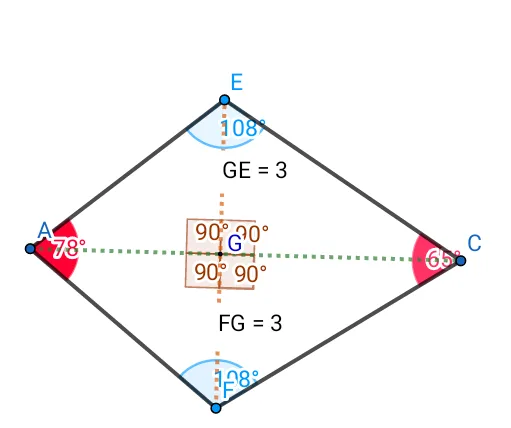
This example demonstrates kite geometry using GeoGebra, showcasing concepts like normal distribution, limits, roots, trigonometric functions, and linear equations. Construction involves commands such as Circle, Intersect, Segment, Angle, Distance, and Midpoint, with objects like A, B, C, D, E, F, G. Suitable for high school mathematics to understand geometric shapes and mathematical functions.
GeoGebra Commands & Parameters
Circle(A, B) → cCircle(C, D) → dIntersect(c, d, 1) → EIntersect(c, d, 2) → FSegment(A, E) → fSegment(C, E) → gSegment(C, F) → hSegment(F, A) → iAngle(F, A, E) → αAngle(A, E, C) → βAngle(E, C, F) → γAngle(C, F, A) → δSegment(A, C) → jSegment(F, E) → kIntersect(j, k) → GAngle(F, G, C) → εAngle(A, G, F) → ζAngle(C, G, E) → ηAngle(E, G, A) → θDistance(F, G) → distanceFGMidpoint(F, G) →Distance(G, E) → distanceGEMidpoint(G, E) →
AI Drawing Prompt Reference
Draw a kite shape geometry demonstrating normal distribution, limits, roots, and trigonometric functions. Start by intersecting two circles to form the kite's vertices, then connect the points to create the sides. Calculate key angles and side lengths, and mark the intersection of the diagonals. Finally, analyze the geometric properties through angles and distances to highlight the connection between mathematics and geometry.
The prompt above was compiled from the original drawing commands and is for reference only.