
Kite Construction with Multi-Function Integration
Loading the math board and drawing, please wait…
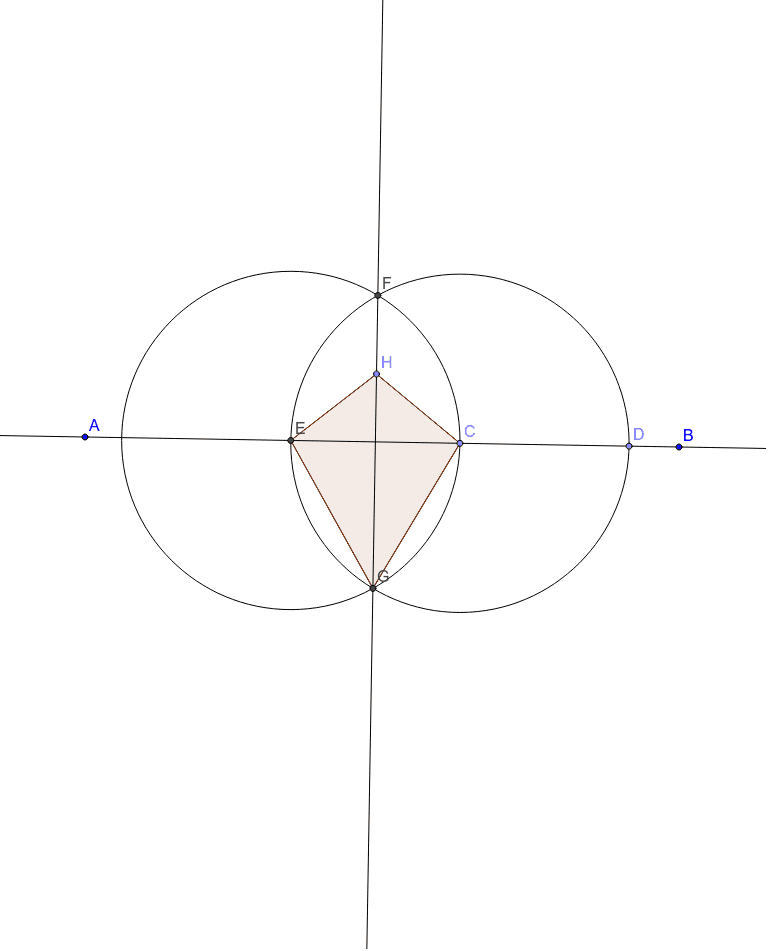
This GeoGebra example constructs a kite-shaped geometric figure while integrating linear functions, quadratic equations, bar charts, normal distribution, and hyperbolas. It demonstrates the kite's symmetry and perpendicular diagonals alongside various function graphs. The construction uses commands like Line, Point, Circle, Intersect, Segment, and Polygon, creating points A, B, C, D, lines a, b, c, and circles, ultimately forming polygon poly1 with auxiliary objects h_1, e_1, etc. Suitable for middle and high school mathematics, this example helps visualize geometric constructions in relation to function graphs and supports interdisciplinary exploration of math concepts.
GeoGebra Commands & Parameters
Line(A, B) → aPoint(a) → CPoint(a) → DCircle(C, D) → cIntersect(c, a, 2) → ECircle(E, C) → dIntersect(c, d, 2) → FIntersect(c, d, 1) → GLine(F, G) → bPoint(b) → HSegment(H, E) → eSegment(H, C) → fSegment(C, G) → gSegment(E, G) → hPolygon(H, E, G, C) → poly1, h_1, e_1, g_1, c_1
AI Drawing Prompt Reference
Draw a kite-shaped geometric figure incorporating linear functions, quadratic equations, bar charts, normal distribution, and hyperbolas. Highlight the kite's symmetry and perpendicular diagonals, and include auxiliary objects. Start by drawing two intersecting line segments to get a point, then use this point as the center to draw a circle. Intersect the circle with the line segments to find new points, continuing this process to form the kite, and label the related segments and areas.
The prompt above was compiled from the original drawing commands and is for reference only.