
Kite and Trapezoid Construction
Loading the math board and drawing, please wait…
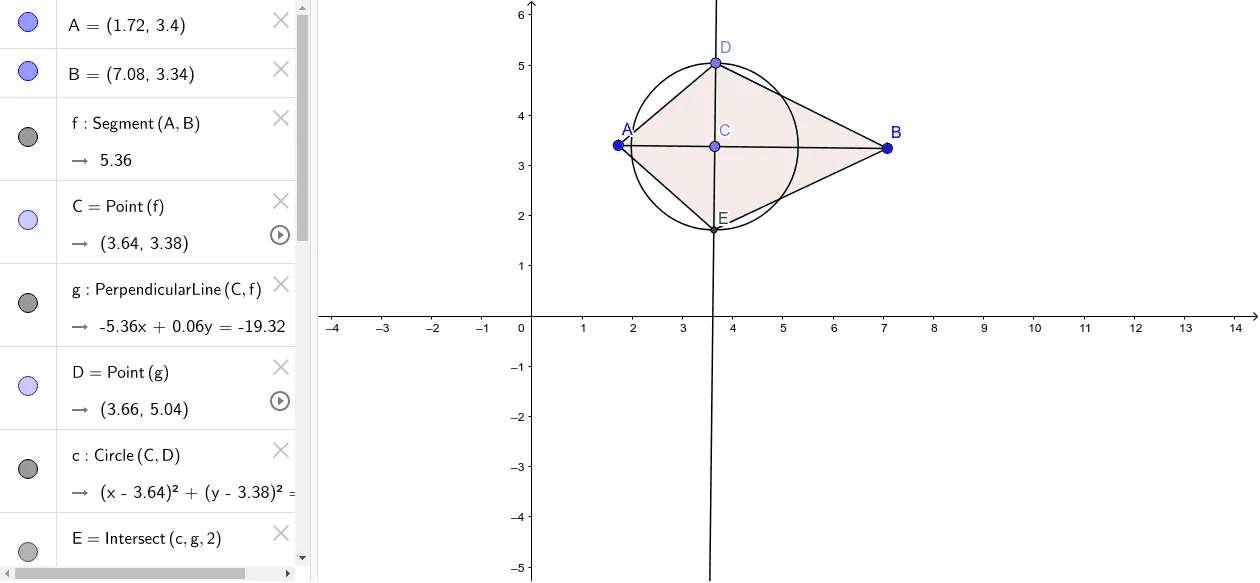
This example demonstrates the geometric construction of kites and trapezoids, highlighting their relationships. Key math concepts include polygon construction, circle-line segment intersections, orthogonal lines, and geometric transformations. The construction uses commands like Segment, Point, OrthogonalLine, Circle, Intersect, and Polygon. Suitable for high school mathematics education, focusing on complex geometric figure construction methods and properties.
GeoGebra Commands & Parameters
Segment(A, B) → fPoint(f) → COrthogonalLine(C, f) → gPoint(g) → DCircle(C, D) → cIntersect(c, g, 2) → ESegment(A, D) → hSegment(A, E) → iSegment(E, B) → jSegment(B, D) → kPolygon(A, D, B, E) → poly1, a, d, b, e
AI Drawing Prompt Reference
Draw a horizontal segment as the base, pick a point on it, and construct a perpendicular line through that point. Choose a point on this perpendicular, then draw a circle centered at the base point with radius to the chosen point. The circle intersects the perpendicular again at another point. Connect the base endpoints to both the chosen point and the new intersection to form a quadrilateral. Finally, outline the four vertices as a polygon, creating a kite-like shape combined with a trapezoid, featuring a vertical symmetry axis.
The prompt above was compiled from the original drawing commands and is for reference only.