
Kite and Polygon Construction
Loading the math board and drawing, please wait…
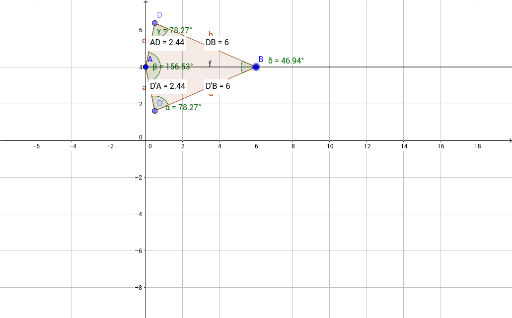
This example demonstrates how to construct a kite and related polygons using rays, circles, and intersection points. Core mathematical concepts include polygon construction, symmetry, angle measurement, distance calculation, and inequality representation. The construction leverages GeoGebra commands and objects such as Ray, Circle, Intersect, Point, Mirror, Polygon, Angle, and Distance as outlined in the summary. It is suitable for high school mathematics education, showcasing geometric construction techniques and spatial geometric relationships.
GeoGebra Commands & Parameters
Ray(A, B) → fCircle(B, A) → cIntersect(c, f, 2) → CPoint(c) → DMirror(D, f) → D'Polygon(A, D', B, D) → poly1, a, d', b, dAngle(B, D', A) → αAngle(D', A, D) → βAngle(A, D, B) → γAngle(D, B, D') → δDistance(D', A) → distanceD'ADistance(A, D) → distanceADDistance(D, B) → distanceDBDistance(D', B) → distanceD'B
AI Drawing Prompt Reference
Draw a kite and related polygons. Start by drawing a ray from point A to point B, then draw a circle centered at point B. The second intersection of the circle and the ray is point C. Find point D on the circle and reflect it over the ray to get point D'. Use points A, D', B, and D to draw a quadrilateral. Measure angles B-D'-A, D'-A-D, A-D-B, and D-B-D'. Calculate the distances between D' and A, A and D, D and B, and D' and B.
The prompt above was compiled from the original drawing commands and is for reference only.