
Khan-Orthocenter: Dynamic Construction and Properties of the Triangle's Orthocen
Loading the math board and drawing, please wait…
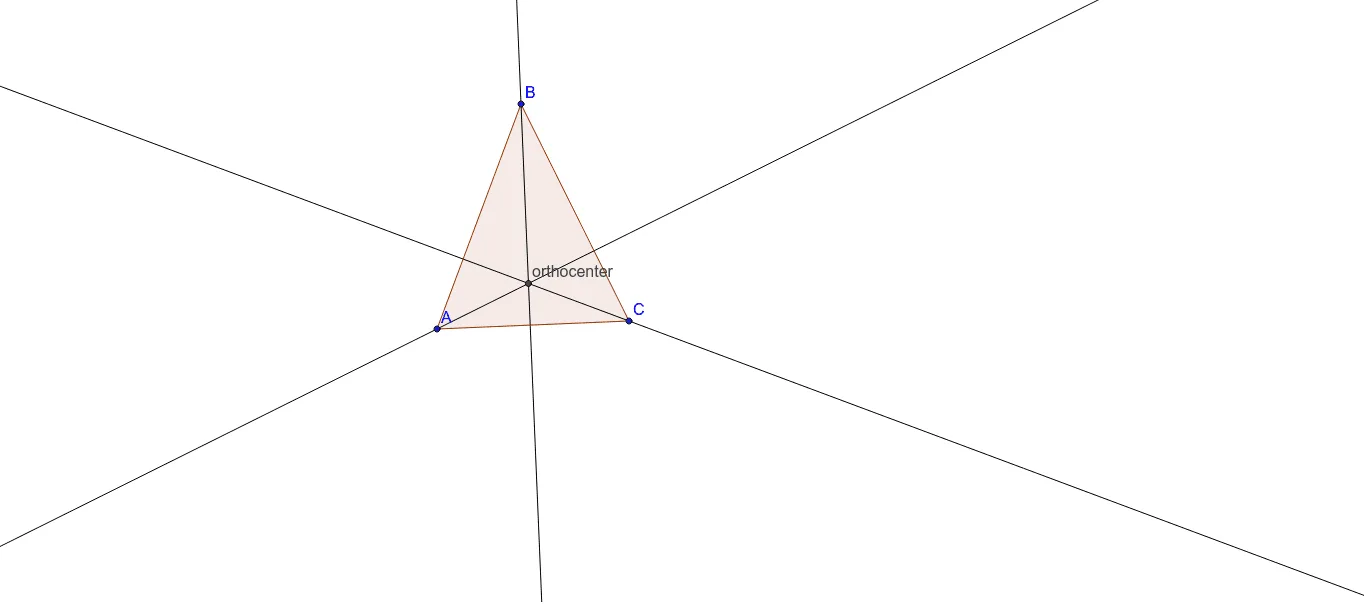
① This example demonstrates how to dynamically construct the orthocenter (intersection of the three altitudes) of any triangle in GeoGebra, and visually explore how its position changes as the vertices move. ② The core mathematical concept is the orthocenter of a triangle and its properties, including the relationship with the three altitudes, the orthocenter lying inside for acute triangles, at the right-angle vertex for right triangles, and outside for obtuse triangles. ③ Construction highlights: using the Polygon command to create triangle poly1 (vertices A, B, C), the OrthogonalLine command to draw perpendicular lines from each vertex to the opposite side (lines c, a, b, d, e, f), and the Intersect command to find the intersection point of these altitudes, yielding the orthocenter. ④ Suitable for middle and high school students learning about the five centers of a triangle (centroid, circumcenter, incenter, orthocenter, excenter), and also useful for teachers in classroom demonstrations or for students to independently explore orthocenter properties by dragging vertices to observe the orthocenter's trajectory, deepening their understanding of triangle geometry.
GeoGebra Commands & Parameters
Polygon(A, B, C) → poly1, c, a, bOrthogonalLine(A, a) → dOrthogonalLine(C, c) → eOrthogonalLine(B, b) → fIntersect(d, e) → orthocenter
AI Drawing Prompt Reference
Draw a triangle ABC and construct its three altitudes, finding their intersection point, which is the orthocenter of the triangle. First, draw triangle ABC, then construct perpendicular lines from each vertex to the opposite side, and finally find the intersection of these three altitudes to observe how the orthocenter moves as you drag the vertices.
The prompt above was compiled from the original drawing commands and is for reference only.