
Altitudes of a Triangle: Orthocentre
Loading the math board and drawing, please wait…
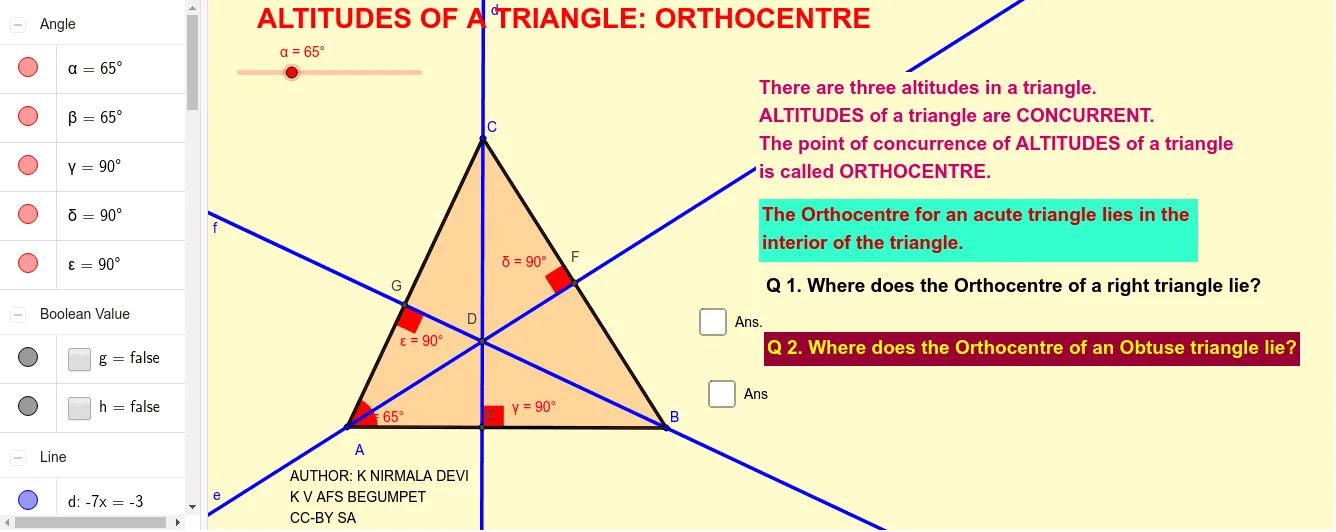
① This GeoGebra example dynamically demonstrates the three altitudes of a triangle (perpendicular segments from each vertex to the opposite side) and their common intersection point, the orthocentre. ② Core mathematical concepts include triangle altitudes, orthocentre, perpendicularity, angle measurement, and polygon construction, rooted in Euclidean geometry. ③ Construction highlights: using Segment to build triangle sides, OrthogonalLine for altitudes, Intersect to find the orthocentre, Rotate and Angle for angle labels, and Polygon for the triangle region; objects include vertices A, B, C, altitude lines d, e, f, orthocentre G, multiple text labels, and angle variables (α, β, γ). Dragging vertices or using sliders allows dynamic observation of how the orthocentre moves for acute, right, or obtuse triangles. ④ Suitable for middle and high school geometry classes, ideal for exploring the existence of the orthocentre, its position relative to triangle type, and as an introductory dynamic geometry activity.
GeoGebra Commands & Parameters
Segment(A, B) → aRotate(B, α, A) → CAngle(B, A, C) → βSegment(A, C) → bSegment(C, B) → cOrthogonalLine(C, a) → dOrthogonalLine(A, c) → eOrthogonalLine(B, b) → fIntersect(e, f) → DIntersect(a, d) → EIntersect(e, c) → FIntersect(f, b) → GAngle(B, E, C) → γAngle(C, F, A) → δAngle(A, G, B) → εPolygon(C, A, B) → poly1, b_1, c_1, a_1Segment(A, C) → iSegment(C, B) → jSegment(B, A) → k
AI Drawing Prompt Reference
Draw a triangle and draw perpendicular segments from each vertex to the opposite side, called altitudes. The point where the three altitudes intersect is called the orthocenter. Label the three vertices, the three altitudes, and the orthocenter. Display the angles at the vertices. Fill the interior of the triangle with color. Drag the vertices to dynamically observe the position of the orthocenter and show how it changes for acute, right, and obtuse triangles.
The prompt above was compiled from the original drawing commands and is for reference only.