
Kaleidoscope Pattern Transformation
Loading the math board and drawing, please wait…
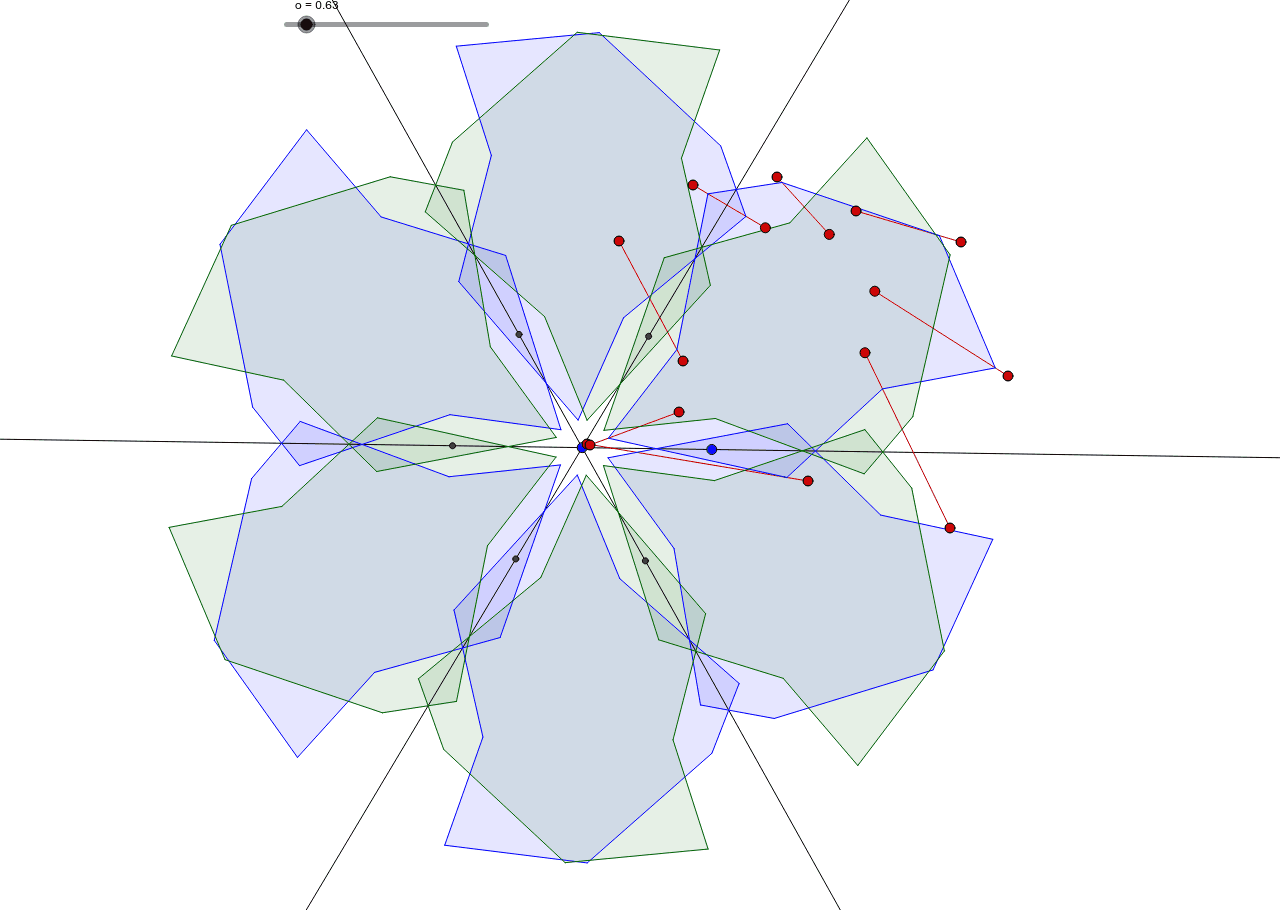
This example demonstrates geometric transformations such as reflection, rotation, and translation by dragging red points to change shapes and patterns. Commands used include Line, Circle, Intersect, Segment, Dilate, Polygon, Mirror, and Rotate. Suitable for middle school and above students to learn about geometric transformations and pattern design.
GeoGebra Commands & Parameters
Line(A, B) → aCircle(A, B) → cCircle(B, A) → dIntersect(c, d, 1) → CCircle(C, A) → eIntersect(c, d, 2) → DCircle(D, A) → fIntersect(c, e, 1) → EIntersect(c, a, 2) → FIntersect(c, f, 2) → GLine(E, A) → bLine(C, A) → gSegment(H, I) → hSegment(J, K) → iSegment(L, M) → jSegment(N, O) → kSegment(P, Q) → lSegment(R, S) → mSegment(T, U) → nSegment(V, W) → pDilate(I, 0.5 + (0.5 * cos(o)), H) → I'Dilate(L, 0.5 + (0.5 * cos(o)), M) → L'Dilate(Q, 0.5 + (0.5 * cos(o)), P) → Q'Dilate(T, 0.5 + (0.5 * cos(o)), U) → T'Dilate(J, 0.5 + (0.5 * sin(o)), K) → J'Dilate(O, 0.5 + (0.5 * sin(o)), N) → O'Dilate(R, 0.5 + (0.5 * sin(o)), S) → R'Dilate(W, 0.5 + (0.5 * sin(o)), V) → W'Polygon(I', J', L', O', Q', R', T', W') → poly1, i', j', l', o', q', r', t', w'Mirror(I', g) → I''Mirror(J', g) → J''Mirror(L', g) → L''Mirror(O', g) → O''Mirror(Q', g) → Q''Mirror(R', g) → R''Mirror(T', g) → T''Mirror(W', g) → W''Polygon(I'', J'', L'', O'', Q'', R'', T'', W'') → poly1', i'', j'', l'', o'', q'', r'', t'', w''Mirror(I'', b) → I'''Mirror(J'', b) → J'''Mirror(L'', b) → L'''Mirror(O'', b) → O'''Mirror(Q'', b) → Q'''Mirror(R'', b) → R'''Mirror(T'', b) → T'''Mirror(W'', b) → W'''Polygon(I''', J''', L''', O''', Q''', R''', T''', W''') → poly1'', i''', j''', l''', o''', q''', r''', t''', w'''Mirror(I''', a) → ZMirror(J''', a) → A_1Mirror(L''', a) → B_1Mirror(O''', a) → C_1Mirror(Q''', a) → D_1Mirror(R''', a) → E_1Mirror(T''', a) → F_1Mirror(W''', a) → G_1Polygon(Z, A_1, B_1, C_1, D_1, E_1, F_1, G_1) → poly1''', z_1, a_1, b_1, c_1, d_1, e_1, f_1, g_1Mirror(Z, g) → Z'Mirror(A_1, g) → H_1Mirror(B_1, g) → I_1Mirror(C_1, g) → J_1Mirror(D_1, g) → K_1Mirror(E_1, g) → L_1Mirror(F_1, g) → M_1Mirror(G_1, g) → N_1Polygon(Z', H_1, I_1, J_1, K_1, L_1, M_1, N_1) → poly2, z', h_1, i_1, j_1, k_1, l_1, m_1, n_1Mirror(Z', b) → Z''Mirror(H_1, b) → O_1Mirror(I_1, b) → P_1Mirror(J_1, b) → Q_1Mirror(K_1, b) → R_1Mirror(L_1, b) → S_1Mirror(M_1, b) → T_1Mirror(N_1, b) → U_1Polygon(Z'', O_1, P_1, Q_1, R_1, S_1, T_1, U_1) → poly2', z'', o_1, p_1, q_1, r_1, s_1, t_1, u_1Rotate(I', 60°, A) → I''_1Rotate(J', 60°, A) → J''_1Rotate(L', 60°, A) → L''_1Rotate(O', 60°, A) → O''_1Rotate(Q', 60°, A) → Q''_1Rotate(R', 60°, A) → R''_1Rotate(T', 60°, A) → T''_1Rotate(W', 60°, A) → W''_1Polygon(I''_1, J''_1, L''_1, O''_1, Q''_1, R''_1, T''_1, W''_1) → poly1'_1, i''_1, j''_1, l''_1, o''_1, q''_1, r''_1, t''_1, w''_1Mirror(I''_1, b) → V_1Mirror(J''_1, b) → W_1Mirror(L''_1, b) → Z_1Mirror(O''_1, b) → A_2Mirror(Q''_1, b) → B_2Mirror(R''_1, b) → C_2Mirror(T''_1, b) → D_2Mirror(W''_1, b) → E_2Polygon(V_1, W_1, Z_1, A_2, B_2, C_2, D_2, E_2) → poly3, v_1, w_1, z_2, a_2, b_2, c_2, d_2, e_2Mirror(V_1, a) → F_2Mirror(W_1, a) → G_2Mirror(Z_1, a) → H_2Mirror(A_2, a) → I_2Mirror(B_2, a) → J_2Mirror(C_2, a) → K_2Mirror(D_2, a) → L_2Mirror(E_2, a) → M_2Polygon(F_2, G_2, H_2, I_2, J_2, K_2, L_2, M_2) → poly3', f_2, g_2, h_2, i_2, j_2, k_2, l_2, m_2Mirror(F_2, g) → N_2Mirror(G_2, g) → O_2Mirror(H_2, g) → P_2Mirror(I_2, g) → Q_2Mirror(J_2, g) → R_2Mirror(K_2, g) → S_2Mirror(L_2, g) → T_2Mirror(M_2, g) → U_2Polygon(N_2, O_2, P_2, Q_2, R_2, S_2, T_2, U_2) → poly3'', n_2, o_2, p_2, q_2, r_2, s_2, t_2, u_2Mirror(N_2, b) → V_2Mirror(O_2, b) → W_2Mirror(P_2, b) → Z_2Mirror(Q_2, b) → A_3Mirror(R_2, b) → B_3Mirror(S_2, b) → C_3Mirror(T_2, b) → D_3Mirror(U_2, b) → E_3Polygon(V_2, W_2, Z_2, A_3, B_3, C_3, D_3, E_3) → poly3''', v_2, w_2, z_3, a_3, b_3, c_3, d_3, e_3Mirror(V_2, a) → F_3Mirror(W_2, a) → G_3Mirror(Z_2, a) → H_3Mirror(A_3, a) → I_3Mirror(B_3, a) → J_3Mirror(C_3, a) → K_3Mirror(D_3, a) → L_3Mirror(E_3, a) → M_3Polygon(F_3, G_3, H_3, I_3, J_3, K_3, L_3, M_3) → poly4, f_3, g_3, h_3, i_3, j_3, k_3, l_3, m_3
AI Drawing Prompt Reference
Create a symmetrical hexagonal pattern by first drawing two intersecting lines a and b, then drawing two circles c and d with their intersection as the center, followed by circles e and f through points C and D, and circles g and h through points E and F. Draw segments i to p, then dilate these segments around the intersection points using cosine and sine values to create polygon poly1. Mirror poly1 across lines g and b, and finally mirror the result across line a to obtain the final hexagonal pattern Z.
The prompt above was compiled from the original drawing commands and is for reference only.