
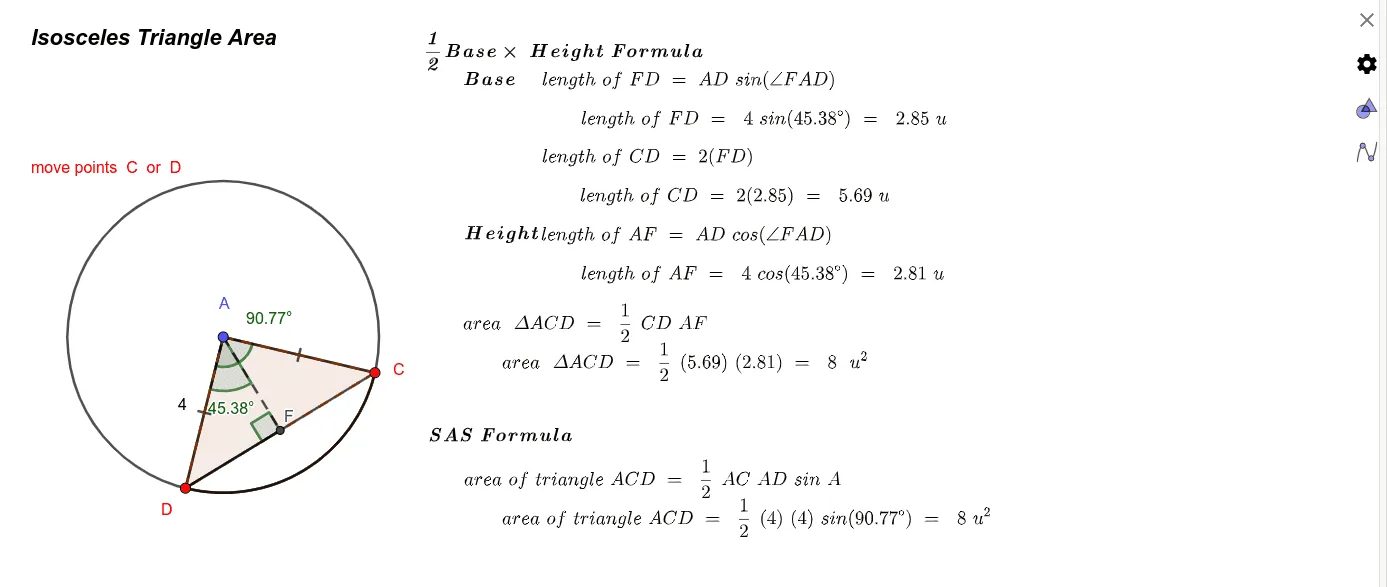
Isosceles Triangle Area
Loading the math board and drawing, please wait…
GeoGebra Commands & Parameters
Circle(A, B) → cPoint(c) → CPoint(c) → DCircleSector(A, D, C) → dAngle(D, A, C) → αSegment(A, C) → fSegment(A, D) → gArea(c) → aPointIn(c) → PointcCircleArc(A, D, C) → eSegment(D, C) → hPolygon(A, C, D) → t1, d_1, a_1, c_1Intersect(d, f, 1) → EOrthogonalLine(A, h) → iIntersect(i, h) → FSegment(A, F) → jAngle(D, A, F) → βSegment(F, D) → kAngle(A, F, D) → γ
AI Drawing Prompt Reference
Draw an isosceles triangle and dynamically show its area in relation to the circumcircle, orthocenter, and conic sections. Start by constructing the isosceles triangle with labeled base and apex, then draw the circumcircle and orthocenter. Adjust the apex angle or base length dynamically to observe area changes, and display angle bisectors and perpendiculars. Finally, connect the orthocenter to the apex and label the angles to illustrate properties and area formulas of isosceles triangles.
The prompt above was compiled from the original drawing commands and is for reference only.