
Isosceles Trapezoid Construction with Symmetry in GeoGebra
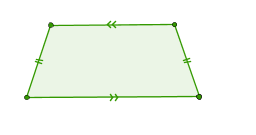
Loading the math board and drawing, please wait…
①This interactive GeoGebra workshop demonstrates how to construct an isosceles trapezoid using reflection symmetry, and explores its geometric properties such as equal legs, parallel bases, and axis of symmetry. ②Core mathematical concepts include the definition of an isosceles trapezoid, axial symmetry, perpendicular bisectors, and relationships between sides and angles. ③Construction steps: use the Segment command to draw base AB, Line to create a parallel line, LineBisector to construct the perpendicular bisector as the symmetry axis, Mirror to reflect one leg across the axis to obtain the other leg, and Polygon to form the trapezoid poly1. Objects like A', C', and h' are used to verify symmetry. ④Suitable for middle school geometry lessons or teacher workshops, helping learners visualize symmetry properties and practice GeoGebra transformation tools.
GeoGebra Commands & Parameters
Segment(A, B) → fLine(C, f) → gSegment(A, C) → hLineBisector(A, B) → iMirror(A, i) → A'Mirror(C, i) → C'Segment(A', C') → h'Polygon(C, A, B, C') → poly1, c, a, b, c'