
Islamic Tessellation Grid - Rhombi
Loading the math board and drawing, please wait…
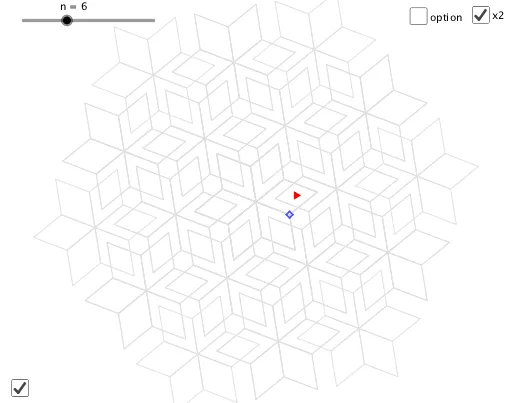
This example demonstrates the construction of rhombi in Islamic tessellation grids. Key mathematical concepts include properties of rhombi, relationships between triangles and rhombi, algebraic operations, and circle construction. The construction involves GeoGebra commands like Midpoint, Circle, Rotate, Intersect, and objects such as n, A, B, c, C, D. Suitable for middle or high school mathematics to understand geometric construction and tiling patterns.
GeoGebra Commands & Parameters
Midpoint(Corner[1], Corner[3]) → ACircle(A, B) → cRotate(B, (360 * ° / n), A) → CCircle(C, A) → dCircle(B, A) → eIntersect(d, e, 2) → DSequence(Polygon[Rotate[A, ((i * 360) * ° / n), A], Rotate[B, ((i * 360) * ° / n), A], Rotate[D, ((i * 360) * ° / n), A], Rotate[C, ((i * 360) * ° / n), A]], i, 1, n) → L_1Point(Segment[A, D]) → EMirror(L_1, E) → L_2Sequence(Rotate[L_2, ((i * 360) * ° / n), A], i, 1, n) → L_3Mirror(L_1, Mirror[A, E]) → L_4Sequence(Rotate[L_4, ((i * 360) * ° / (((1 + a) * n))), A], i, 1, ((1 + a) * n)) → L_5Mirror(A, E) → A'Sequence(Rotate[Sequence[Rotate[L_1, ((i * 360) * ° / n), A'], i, 1, n], ((((2 - a) * j) * 360) * ° / n), A], j, 1, n) → L_6
AI Drawing Prompt Reference
Draw an Islamic tessellation grid composed of rhombuses. Start by drawing a circle, then find the midpoint between the center and a point on the circle, and draw another circle with this midpoint as the center. Rotate a point on the circle by a certain angle to get another point, and draw circles with these two points as centers to find their intersection. Repeat this process to generate multiple rhombuses, and rotate, mirror, and arrange them to form a complex mosaic pattern.
The prompt above was compiled from the original drawing commands and is for reference only.