
Introduction to Similarity
Loading the math board and drawing, please wait…
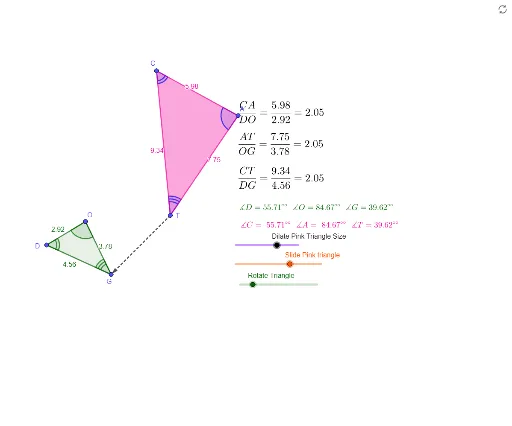
This example demonstrates the properties and criteria of similar triangles through dynamic transformations, visually showcasing the similarity relationships between shapes. The core mathematical concepts involved include similarity criteria for triangles, geometric transformations (translation, rotation, dilation), vector operations, angles, and polygons. The construction leverages GeoGebra commands and objects such as Vector, Translate, Polygon, Rotate, Dilate, and Angle as outlined in the summary. It is suitable for high school geometry instruction, aiding in the intuitive understanding of similarity transformations and properties, and enhancing spatial reasoning skills.
GeoGebra Commands & Parameters
Vector(G, T) → uTranslate(D, u) → A'Polygon(D, O, G) → t1, c, a, bTranslate(O, u) → B'Translate(G, u) → C'Polygon(A', B', C') → t1', c', a', b'Rotate(B', (-θ), T) → B''Rotate(C', (-θ), T) → C''Rotate(A', (-θ), T) → A''Polygon(A'', B'', C'') → t1'', c'', a'', b''Dilate(A'', k, T) → CDilate(B'', k, T) → ADilate(C'', k, T) → C'''Polygon(C, A, C''') → t1''', c''', a''', b'''Angle(D, O, G) → βAngle(O, G, D) → γAngle(G, D, O) → δAngle(T, C, A) → εAngle(A, T, C) → ζAngle(C, A, T) → ηVector(T, G) → v
AI Drawing Prompt Reference
Draw two similar triangles to demonstrate similarity through dynamic transformations like translation, rotation, and dilation. Start by creating a triangle, then translate, rotate, and scale it to form another triangle. Apply the same transformations to the second triangle and observe the changes. Label the interior angles of the original triangles and key angles during transformations, using a vector to indicate the translation direction. Finally, combine the transformed triangles into a new shape to show the similarity relationship.
The prompt above was compiled from the original drawing commands and is for reference only.