
Introduction to Limits with Geometric and Trigonometric Exploration
Loading the math board and drawing, please wait…
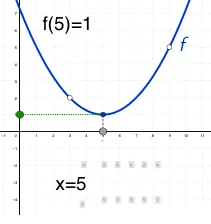
① This example visualizes the concept of limits through geometric constructions involving squares, equilateral triangles, cuboids, and trigonometric functions. ② Core mathematical ideas include limits, sequences, continuity, trigonometric identities, and spatial reasoning. ③ The construction uses GeoGebra commands such as Point, OrthogonalLine, Intersect, and Segment to define points, perpendicular lines, intersections, and segments; objects like origin, D, D_1, D_2, text labels, sliders, and export items illustrate the limiting process dynamically. ④ Designed for high‑school students (grades 10‑12) and early college calculus courses, it serves as an interdisciplinary tool for teaching limits with geometry and trigonometry.
GeoGebra Commands & Parameters
Point(xAxis) → originOrthogonalLine(argument, xAxis) → aIntersect(f, a, (5, 1)) → valueSegment(value, argument) → bOrthogonalLine(value, yAxis) → cIntersect(c, yAxis) → APoint(c) → BSegment(A, B) → dPoint(d) → H
AI Drawing Prompt Reference
Place a fixed origin on the x‑axis, draw a perpendicular through a movable point on the x‑axis to meet a given curve near (5,1), then connect that intersection back to the movable point forming a segment; next draw a line through the intersection perpendicular to the y‑axis to meet the y‑axis, pick a point on this horizontal line, join it to the y‑axis intersection to form another segment, and finally mark a point on that segment to illustrate the limiting behavior dynamically.
The prompt above was compiled from the original drawing commands and is for reference only.