
Intersection Activity
Loading the math board and drawing, please wait…
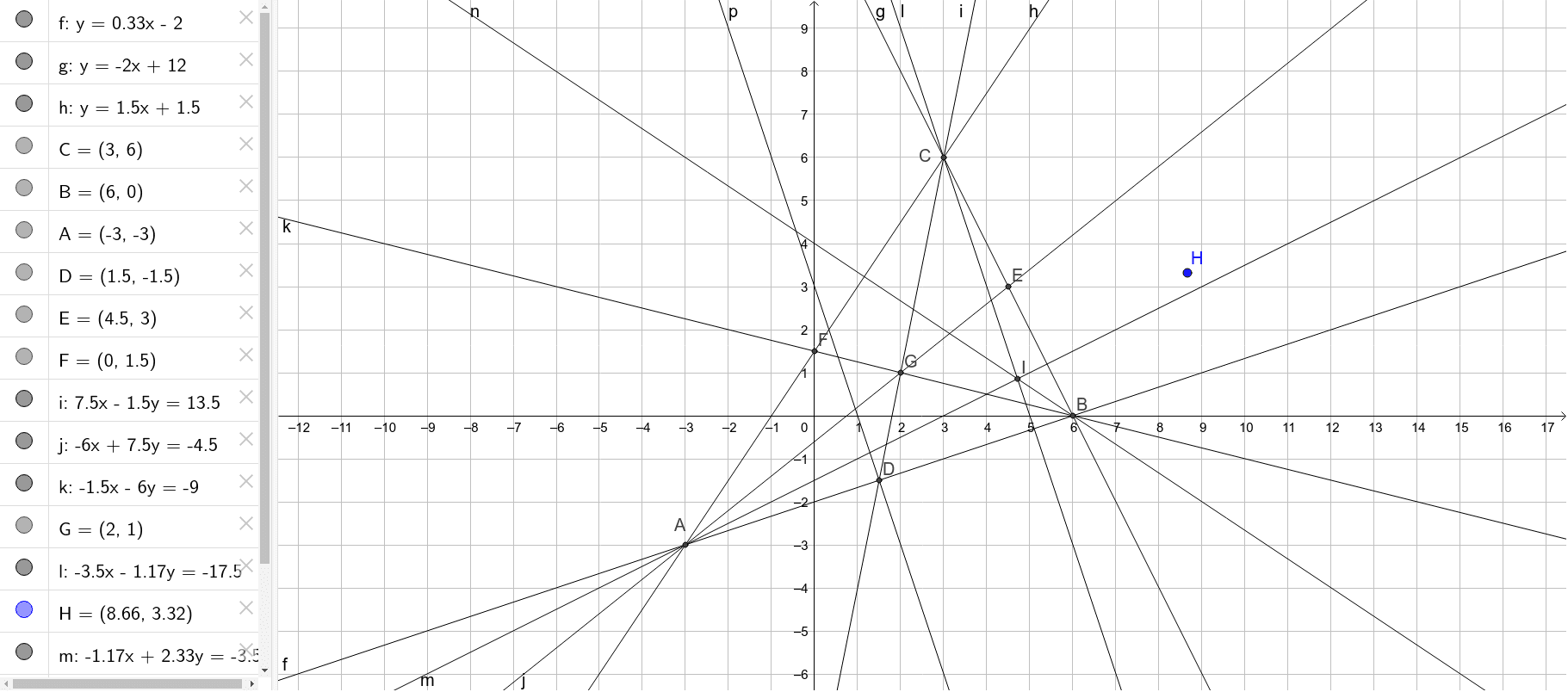
This example demonstrates the process of calculating intersection points and geometric constructions using GeoGebra software. Core mathematical concepts involved include intersection, midpoint, line, orthogonal line, function graphs, trigonometry, centroid, etc. Key construction points utilize GeoGebra commands and objects such as Intersect, Midpoint, Line, and OrthogonalLine. Suitable for high school and above learners to understand the practical application of analytical geometry and geometric constructions.
GeoGebra Commands & Parameters
Intersect(h, g) → CIntersect(f, g) → BIntersect(f, h) → AMidpoint(A, B) → DMidpoint(C, B) → EMidpoint(A, C) → FLine(C, D) → iLine(A, E) → jLine(B, F) → kIntersect(i, j) → GOrthogonalLine(C, f) → lOrthogonalLine(A, g) → mOrthogonalLine(B, h) → nIntersect(l, m) → IOrthogonalLine(D, f) → p
AI Drawing Prompt Reference
Draw three curves or lines that intersect pairwise, creating three intersection points that form a triangle. Mark the midpoint of each side of the triangle. Connect each vertex to the midpoint of the opposite side, producing three medians that meet at a single point. Then, from each vertex, draw a line perpendicular to the opposite side; these three perpendiculars also intersect at one point. Finally, take the midpoint of one side and draw a line through it perpendicular to that side. The figure shows the triangle, its medians, perpendiculars, and their intersection points.
The prompt above was compiled from the original drawing commands and is for reference only.