
Intersecting Planes by Jason Wofsey
Loading the math board and drawing, please wait…
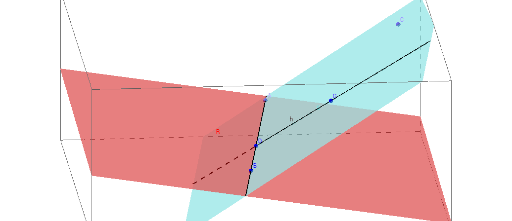
This example demonstrates the intersection of three planes in 3D space, visually showing the formation and changes of the intersection line. Core math concepts include spatial geometry, plane equations, vector cross product, and analytical geometry. Construction highlights from the GeoGebra command summary involve commands like Plane, Line, Point, and PointIn, with objects G, B, D, S, N, R, c, h, A, C. Suitable for high school solid geometry teaching and university introductory courses on spatial analytical geometry, ideal for dynamic demonstrations and explorations.
GeoGebra Commands & Parameters
Plane(G, B, D) → SPlane(B, D, N) → RLine(B, D) → cLine(D, G) → hPoint(c) → APointIn(S) → C
AI Drawing Prompt Reference
Draw three intersecting planes in 3D space to show the formation and changes of their intersection line. First, create planes defined by three points, then draw two intersecting lines and find their intersection point. Determine the point where the first plane intersects one of the lines, and mark the intersection point of the first plane with the other line to clearly show the line of intersection.
The prompt above was compiled from the original drawing commands and is for reference only.