
Interior Intersections Demo
Loading the math board and drawing, please wait…
In collections
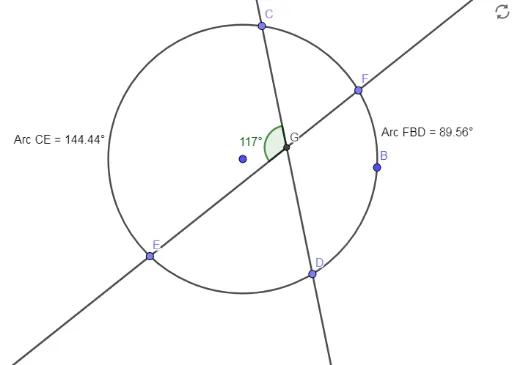
Angles Created by Secants and Tangents
This example demonstrates the relationships between internal intersections of various geometric shapes including circles, parabolas, equilateral triangles, and trapezoids. It involves core mathematical concepts such as intersection calculations, geometric relationships between circles and quadratic curves, angle measurement, and polygon construction. Key GeoGebra commands used in construction are Circle, Point, Line, Intersect, Angle, and Segment. Suitable for high school mathematics education to understand the integration of analytical geometry and geometric construction.
GeoGebra Commands & Parameters
Circle(A, B) → cPoint(c) → CPoint(c) → DLine(C, D) → fPoint(c) → EPoint(c) → FLine(E, F) → gIntersect(f, g) → GAngle(C, G, E) → αSegment(C, A) → hSegment(A, E) → iSegment(F, A) → jSegment(A, D) → kAngle(C, A, E) → βAngle(D, A, F) → γ
AI Drawing Prompt Reference
Draw a geometric figure including a circle, parabola, equilateral triangle, and trapezoid to demonstrate the relationships between their internal intersections. Measure key angles and construct line segments connecting these shapes, showcasing the integration of analytical geometry and geometric construction. Start by drawing a circle, find points on it, draw lines through these points, calculate intersection points, measure angles, and finally connect key points with segments to form a complex geometric structure.
The prompt above was compiled from the original drawing commands and is for reference only.