
Interactive Volume Unit Conversion Practice (L, dl, ml, hl)
Loading the math board and drawing, please wait…
In collections
Wiederholung: Flächen- und Raummaße
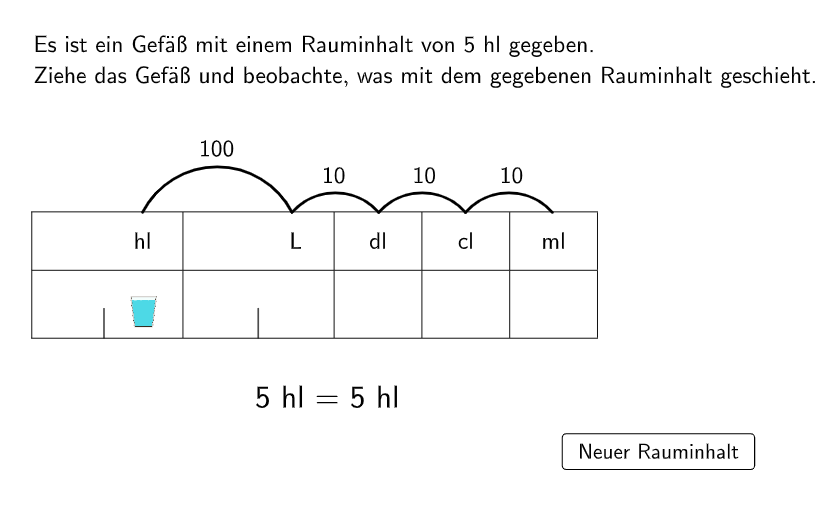
This GeoGebra example is an interactive exercise for grades 5-6 on converting metric volume units, including liters (L), deciliters (dl), milliliters (ml), and hectoliters (hl). It features multiple-choice questions and an open-ended problem about a dripping faucet to reinforce conversion relationships such as 1 L = 10 dl = 1000 ml and 1 hl = 100 L. The construction uses GeoGebra commands like Random, Point, If, IndexOf, Sequence, TableText, and Text to generate dynamic questions, with variables (questionCount, units, unitInd, factors) controlling the randomization and unit selection. Interactive buttons (button1, Schaltfläche1) provide immediate feedback, while the open question simulates water drops accumulating in a bowl using objects like water, rectangleWater, and smallLinesM to visualize volume growth. Suitable for upper elementary math classes or self-study, this activity helps students master unit conversions and develop a sense of measurement.
GeoGebra Commands & Parameters
Random(1, Length[units]) → unitIndPoint(allowedPos) → AIf(questionCount ≟ 1, 5, If[questionCount > 1 ∧ unitInd ≟ 1, round(RandomUniform[0, 10], 2), questionCount > 1 ∧ unitInd ≟ 2, round(RandomUniform[0, 10], 1), questionCount > 1 ∧ unitInd ≟ 3, round(RandomUniform[0, 100], 2), questionCount > 1 ∧ unitInd ≟ 4, round(RandomUniform[0, 1000], 1), questionCount > 1 ∧ unitInd ≟ 5, round(RandomUniform[0, 10000], 0)]) → valIndexOf(A, allowedPos) → indexCurrentPosSequence(Semicircle[l1(i), l1(i + 1)], i, 1, Length[l1] - 1) → l2Sequence(Text[(("$\textsf{" * If[i ≟ 1, 1000, 10]) * "}$"), Midpoint[l1(i), l1(i + 1)] + (0, dy), true, true, 0], i, 1, Length[l1] - 1) → l3Sequence(Midpoint[l1(i), l1(i + 1)] - (0, 0.4), i, 1, Length[l1] - 1) → MsSequence(CircleArc[Ms(i), l1(i + 1), l1(i)], i, 1, Length[Ms]) → l4TableText({"\vphantom{\frac{1}{2}}\qquad \quad hl", "\qquad \quad \, L", "dl", "cl", "ml"}, {"\vphantom{\large{\frac{1}{2}}}\hspace{4cm}", "\hspace{4cm}", "\hspace{2cm}", "\hspace{2cm}", "\hspace{2cm}"}, "c_|h") → text1Text(ReplaceAll[(("\textsf{" * NumberSeparationComma[valNew]) * "}"), ".", ","], A + (0.18, 0.36), true, true, 0) → text4Text(text5, (3.1 - (x(Corner[text5, 2]) - x(Corner[text5, 1])) / 2, -0.4), true, true) → text6
AI Drawing Prompt Reference
Create a visual layout for an interactive metric volume unit conversion practice. On a plane, include a small reference point and place a numeric text field near it, with the number displayed as a formatted value that can change. Draw a semicircle-like stepped outline made from multiple adjacent arc segments connected from left to right, with slight vertical offsets between consecutive segments to create a layered contour. Add unit text labels aligned with the layout, including hl, L, dl, cl, and reserve consistent spacing for the remaining unit area where needed. Place additional text elements in the lower/central region to support the answer/feedback role, keeping the overall design structured around matching values to units.
The prompt above was compiled from the original drawing commands and is for reference only.