
Interactive Practice on Circle Equations: Random Target Circle with Input Verifi
Loading the math board and drawing, please wait…
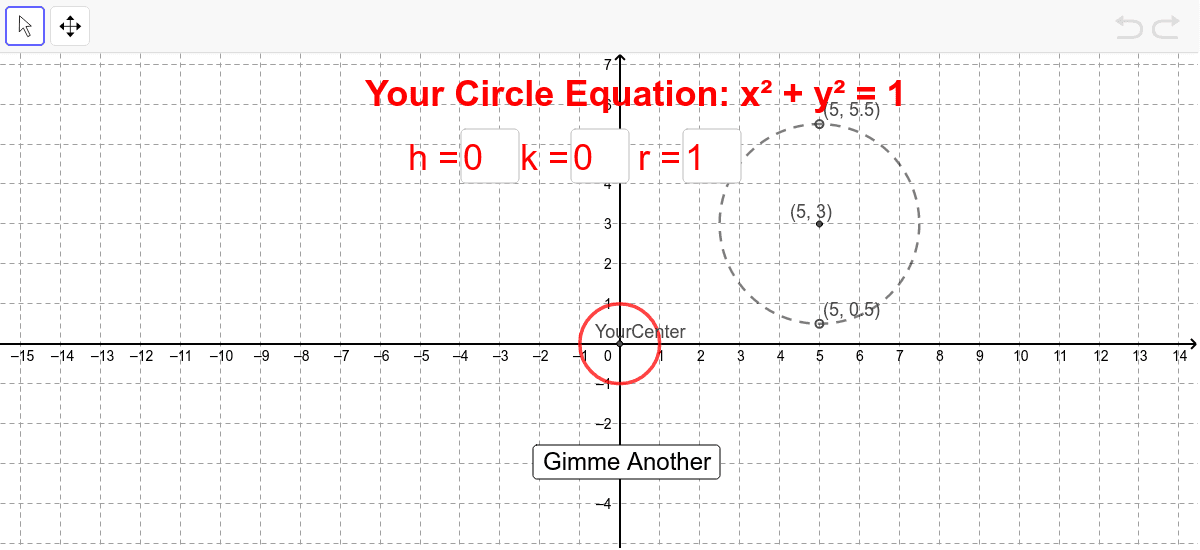
① This interactive GeoGebra example demonstrates how to determine a circle from its center and radius, and verifies whether the user's input matches the randomly generated target circle. ② The core mathematical concept is the standard equation of a circle (x-h)²+(y-k)²=r², involving center coordinates, radius, coordinate geometry, and random generation. ③ Construction highlights: uses GeoGebra commands such as Circle to draw the circle, Random to generate random centers and radii, Textfield and button for user input, OrthogonalLine and Intersect for auxiliary verification, and Element/Dimension to handle random arrays. Objects include targetCircleCoef, YourCenter, YourRadius, and various text/button elements for feedback. ④ Suitable for middle school (advanced) or high school students, this example reinforces circle equation concepts and serves as an engaging classroom activity or self-study tool with immediate feedback.
GeoGebra Commands & Parameters
Element(CM, counter) → targetCircleCoefElement(targetCircleCoef, 1) → thElement(targetCircleCoef, 2) → tkElement(targetCircleCoef, 3) → trCircle(Target, TargetRadius) → cTextfield(h) → inputBox1Textfield(k) → inputBox2Textfield(r) → inputBox3Circle(YourCenter, YourRadius) → dElement(Dimension[CM], 1) → NumberOfEquationsOrthogonalLine(Target, xAxis) → aOrthogonalLine(Target, yAxis) → bIntersect(c, b, 1) → AIntersect(c, a, 2) → BIntersect(c, b, 2) → CIntersect(c, a, 1) → DElement(InfoToGive, counter) → PointsToGiveRandom(1, 4) → WhichPointDimension(InfoToGive) → NumberOfInfoToGive
AI Drawing Prompt Reference
Draw a randomly generated circle with its center and radius determined by the system, displayed on a coordinate plane. Provide three input fields for the x-coordinate, y-coordinate, and radius of the center. After user input, draw another circle and automatically check if it exactly matches the target circle. Additionally, mark four intersection points on the target circle where it meets two lines through the center parallel to the axes, and randomly highlight one of these points as a hint.
The prompt above was compiled from the original drawing commands and is for reference only.