
Inscribed Right Angles
Loading the math board and drawing, please wait…
In collections
Unit 9 - Circles
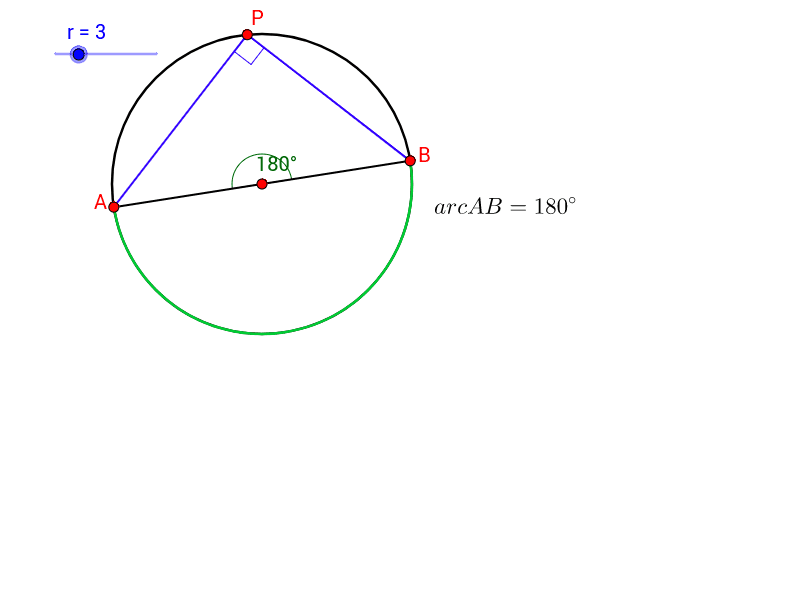
This example demonstrates the geometric properties of inscribed right angles within a circle, illustrating key concepts such as circles, angles, intersections, and the properties of inscribed quadrilaterals. The construction utilizes GeoGebra commands like Circle, Point, Line, Intersect, Segment, Angle, and CircleArc to visualize and explore the theorem that angles inscribed in a semicircle are right angles. It is suitable for high school geometry education and learning, providing an interactive way to understand the complementary nature of opposite angles in inscribed quadrilaterals.
GeoGebra Commands & Parameters
Circle(A_1, r) → cPoint(c) → ALine(A, A_1) → aIntersect(c, a) → C, BSegment(A, B) → bPoint(c) → PSegment(A, P) → dSegment(P, B) → eAngle(A, P, B) → αCircleArc(A_1, A, B) → fAngle(B, A_1, A) → β
AI Drawing Prompt Reference
Draw a circle and select two points on it. Connect these two points to the center of the circle to form a line. The intersections of this line with the circle give two new points. Connect these two new points. Take another point on the circle and connect it to the two new points to form two line segments. Measure the angles between these segments and the line connecting the center to the points. One angle should be a right angle. Draw an arc connecting the center to the two new points and measure the other angle.
The prompt above was compiled from the original drawing commands and is for reference only.