
Inscribed Quadrilateral and Eccentric Angles
Loading the math board and drawing, please wait…
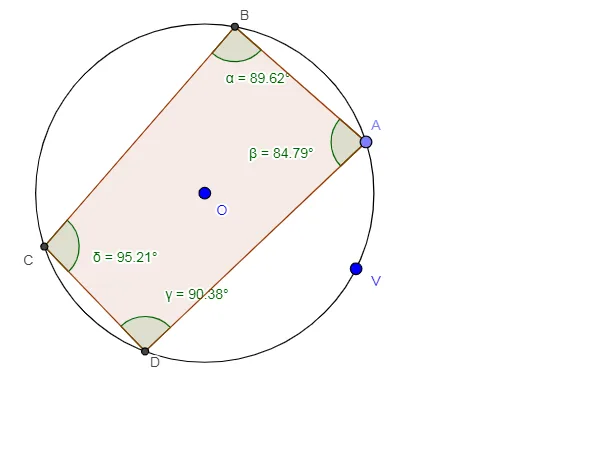
This example demonstrates the geometric relationship between a quadrilateral inscribed in a circle and its eccentric angles. The core mathematical concepts include properties of cyclic quadrilaterals, the relationship between inscribed angles and central angles, and the parametric role of eccentric angles in locating points on a circle or ellipse. Construction highlights: using GeoGebra commands such as Circle to draw the circle, Point to place points on the circle, Intersect to find intersection points, Polygon to form the quadrilateral, Angle to measure angles, and text objects to display angle values. Suitable for high school or early college students to understand the supplementary opposite angles of cyclic quadrilaterals and the intuitive meaning of parametric angles in geometric constructions.
GeoGebra Commands & Parameters
Circle(O, V) → cPoint(c) → D_1Point(c) → ACircle(A, 3) → dIntersect(c, d, 1) → BCircle(B, 5) → eIntersect(c, e, 1) → CCircle(C, 2.5) → fIntersect(c, f, 1) → DPolygon(B, A, D, C) → pol1, b, a, d_1, c_1Angle(C, B, A) → αAngle(B, A, D) → βAngle(A, D, C) → γAngle(D, C, B) → δ
AI Drawing Prompt Reference
Draw a circle with its center at the origin and an arbitrary radius. Place four points on the circle such that they form a quadrilateral inscribed in the circle. To construct them, start with one point on the circle, then draw a small circle centered at that point, intersecting the original circle at a second point. From that second point, draw another small circle, intersecting the original circle at a third point. From the third point, draw yet another small circle, intersecting the original circle at a fourth point. Connect these four points with line segments to form the inscribed quadrilateral. Finally, measure the four interior angles of the quadrilateral and display their values.
The prompt above was compiled from the original drawing commands and is for reference only.