
Inscribed Circle and Right Triangle
Loading the math board and drawing, please wait…
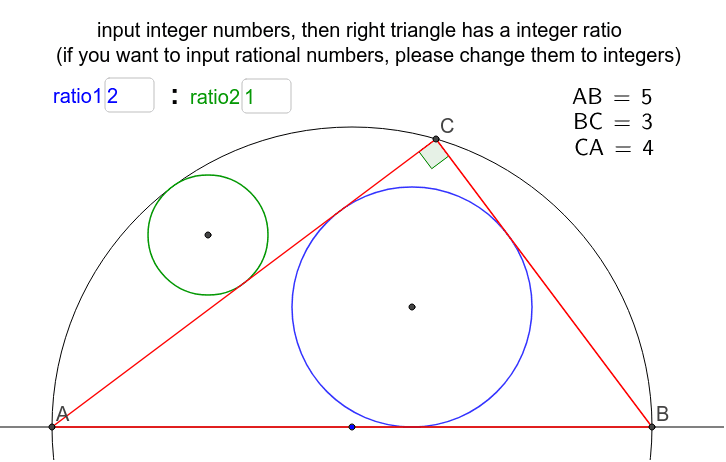
This example demonstrates the geometric phenomenon that when the ratio of inscribed circle radii is rational, the side lengths AB:BC:CA of the triangle should be natural numbers. Key math concepts include inscribed circles, right triangles, rational numbers, and geometric constructions. It leverages GeoGebra commands like Intersect, GCD, LaTeX, Polygon, OrthogonalLine, Midpoint, Circle, Center, Textfield, and Angle for construction. Suitable for high school mathematics education to explore the connection between geometric properties and algebraic relations, enhancing logical reasoning skills.
GeoGebra Commands & Parameters
Intersect(c, a, 1) → AIntersect(c, a, 2) → BGCD(a1, a2) → bGCD(a2, a3) → dGCD(b, d) → eLaTeX(AB, true, true) → text3LaTeX(BC, true, true) → text4LaTeX(CA, true, true) → text5Intersect(c, f, 1) → CPolygon(C, A, B) → poly1, b_1, c_1, a_1内接円(A, B, C) → gOrthogonalLine(O_1, b_1) → hIntersect(c, h, 1) → DIntersect(h, b_1) → EMidpoint(D, E) → O_3Circle(O_3, D) → kCenter(g) → O_2Textfield(m) → ratio1Textfield(n) → ratio2Angle(A, C, B) → α
AI Drawing Prompt Reference
Draw a right triangle and its inscribed circle. Demonstrate that when the ratio of the radii of the inscribed circles is rational, the side lengths of the triangle should be natural numbers. Label the vertices, side lengths, incenter, and incircle. Calculate the midpoint of key points, draw auxiliary lines, and display the side length ratio and angle in text fields to complete the geometric construction.
The prompt above was compiled from the original drawing commands and is for reference only.