
Inkblot Task: Multiplying Powers (Klecksaufgabe)
Loading the math board and drawing, please wait…
In collections
Rechnen mit Potenzen
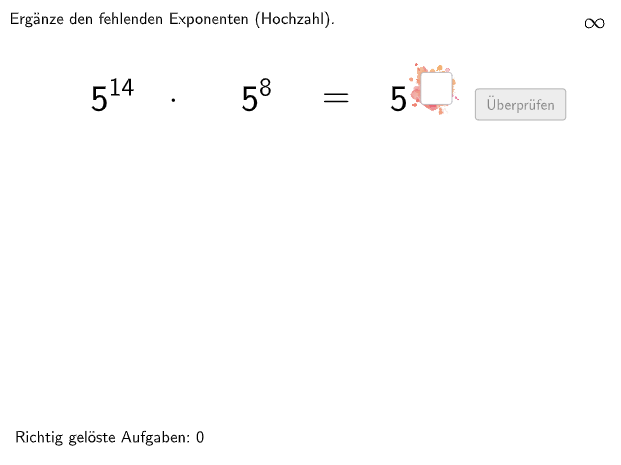
This interactive GeoGebra example presents an inkblot-style exercise where students practice multiplying powers. The core mathematical concept is the laws of exponents, specifically the rule that when multiplying powers with the same base, the exponents are added. The construction uses GeoGebra commands such as Textfield, Shuffle, If, Join, Polygon, Element, Append, Remove, Text, and Midpoint, along with objects like input boxes (InputBox1, InputBox2), validation buttons (btnValidate), answer display (showanswer), hints (hintText), and a scoring system (attemptCount, correctCount). It is designed for grades 7-8, suitable for classroom practice or self-study, helping students describe, apply, and justify elementary exponent rules. The random generation of problems and immediate feedback enhance engagement and mastery.
GeoGebra Commands & Parameters
Textfield(input1) → InputBox1Textfield(input2) → InputBox2Shuffle({1, 2, 3}) → ModusList, {1, 3, 2}If(questionCount ≥ 4, 4, questionCount) → metaprogressionJoin({{3}, ModusList}) → ModusMioPlaylistShuffle(Sequence[i, i, 1, 19]) → AStartList, {14, 1, 5, 17, 6, 19, 10, 7, 18, 4, 2, 9, 16, 11, 15, 13, 3, 12, 8}Shuffle(Sequence[i, i, 1, 19]) → BStartList, {8, 3, 2, 13, 12, 16, 15, 11, 9, 4, 18, 19, 6, 10, 14, 17, 7, 5, 1}Shuffle(Sequence[i, i, 1, 9]) → AMidList, {7, 4, 1, 3, 9, 5, 6, 8, 2}Shuffle(Sequence[i, i, 1, 9]) → BMidList, {6, 5, 2, 4, 1, 7, 8, 9, 3}Polygon(PtopLeftCornerFeedback, PtopRightCornerFeedback, PbottomRightCornerFeedback, PbottomLeftCornerFeedback) → rectangleCorrect, rectangleCorrectS3, rectangleCorrectS4, rectangleCorrectS2, rectangleCorrectS1Shuffle(Sequence[Random[0, 10], i, 1, 100]) → randomNosForX, {3, 6, 6, 2, 4, 10, 1, 7, 2, 7, 6, 2, 5, 2, 8, 5, 10, 6, 8, 4, 10, 7, 8, 6, 8, 0, 8, 8, 2, 9, 6, 1, 4, 10, 4, 3, 9, 1, 9, 3, 6, 3, 0, 4, 6, 6, 4, 6, 5, 5, 2, 1, 0, 5, 8, 8, 2, 2, 5, 7, 7, 4, 0, 4, 4, 6, 9, 2, 6, 8, 6, 5, 9, 5, 5, 7, 10, 8, 0, 10, 5, 5, 0, 1, 1, 4, 8, 9, 8, 5, 9, 9, 8, 4, 2, 3, 5, 7, 5, 3}Element(randomNosForX, Mod[questionCount, 100] + 1) → numXShuffle(Sequence[Random[0, 10], i, 1, 100]) → randomNosForY, {10, 0, 10, 3, 9, 8, 5, 10, 1, 6, 10, 10, 2, 5, 6, 7, 2, 2, 7, 4, 8, 5, 3, 7, 0, 0, 8, 9, 8, 6, 8, 1, 10, 0, 2, 6, 0, 8, 8, 2, 10, 0, 8, 9, 1, 7, 7, 8, 0, 4, 10, 10, 5, 9, 2, 3, 3, 0, 8, 10, 4, 10, 7, 5, 2, 5, 6, 5, 4, 9, 2, 8, 0, 0, 2, 5, 7, 2, 1, 8, 4, 5, 6, 6, 7, 5, 10, 8, 3, 5, 6, 4, 4, 3, 10, 9, 5, 7, 9, 9}Element(randomNosForY, Mod[questionCount, 100] + 1) → numYAppend(true, Sequence[If[randomNosForX(i) ≟ randomNosForX(i - 1), false, true], i, 2, 100]) → stayXAppend(true, Sequence[If[randomNosForY(i) ≟ randomNosForY(i - 1), false, true], i, 2, 100]) → stayYRemove(Sequence[If[stayX(i), randomNosForX(i), 0], i, 1, 100], Sequence[0, i, 1, 100]) → randomNosForXwithoutRepeatRemove(Sequence[If[stayY(i), randomNosForY(i), 0], i, 1, 100], Sequence[0, i, 1, 100]) → randomNosForYwithoutRepeatElement(randomNosForXwithoutRepeat, Mod[questionCount, Length[randomNosForXwithoutRepeat]] + 1) → numXwithoutRepeatElement(randomNosForYwithoutRepeat, Mod[questionCount, Length[randomNosForYwithoutRepeat]] + 1) → numYwithoutRepeatShuffle(Sequence[i, i, 2, 10]) → XStartList, {5, 7, 10, 8, 2, 3, 4, 6, 9}Shuffle(Sequence[i, i, -10, 10] \ {0, 1}) → XGanzzhahlList, {-5, -3, 5, 4, -9, -7, 6, 2, 7, -4, -6, 8, -10, 3, -1, 9, -2, -8, 10}Shuffle(Join[{XDezizahlList, XGanzzhahlList}]) → XMidList, {4.5, 2.2, 2.8, 1.3, 0.8, 1, -10, -6, -1.9, 4.1, 2.7, 6, -2, 4.3, 0.4, -9, 1.2, 1.5, 2, -8, 4.2, 3.5, -0.7, 2.6, 3.2, 0.5, 10, -0.2, 1.8, 1.1, -1.1, -7, 0.9, -3, -1, 5, -0.6, 3.4, 7, 2.1, 2.3, 0.2, 4.4, -0.4, -1.7, -1.2, 3.7, 3.6, 0.6, 1.4, -0.5, -1.6, 2, 4.7, -0.1, 3.3, 5, -1.4, -0.3, 9, 3.9, 0.3, 4, -0.9, -2, 1.9, -5, -0.8, 1.7, 3, -1.8, 8, -1.5, -1, -4, 3.1, 2.4, 3, 2.9, 0.7, 1.6, 4.9, 2.5, 4, -1.3, 4.8, 4.6, 3.8}Text(Text2, E, false, true, -1, 0) → Text6Text(Text3, F, false, true, -1, 0) → Text7Midpoint(Corner[Text6, 1], Corner[Text6, 3]) → Pos1Midpoint(Corner[Text7, 1], Corner[Text7, 3]) → Pos2Textfield(input3) → InputBox3Text(Text4, B, false, true, -1, 0) → Text10Midpoint(Corner[Text10, 1], Corner[Text10, 3]) → Pos3If(modus ≟ 1, Defined[input1], modus ≟ 2, Defined[input2], Defined[input3]) → fixed
AI Drawing Prompt Reference
Create an interactive graphic for practicing the multiplication of powers, including two input boxes for entering exponents, a validation button to check answers, and an area to display the correct answer. Randomly generate questions for students to practice the rule of multiplying powers. The graphic includes multiple randomly generated points and line segments, as well as some hint texts. Please draw in the following order: first, draw two input boxes, then generate some points and line segments randomly, next add the validation button and the area to display the correct answer, and finally add the hint texts.
The prompt above was compiled from the original drawing commands and is for reference only.