
Infinite Limits and Limits at Infinity
Loading the math board and drawing, please wait…
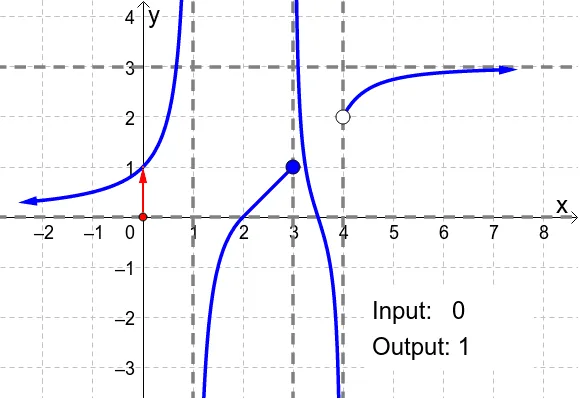
① This applet dynamically demonstrates the behavior of a function as the input approaches a specific point or infinity, showing outputs that tend to infinity or to finite values. ② Core mathematical concepts include infinite limits, limits at infinity, vertical and horizontal asymptotes, and the divergence of functions near special points. ③ Construction details: Based on the summary, the applet uses GeoGebra commands such as Point, Polygon, and Vector, creating objects H, K, L, M, N, poly1, lines k, l, m, n, f, a, b, A, B, g, u, v, text1, c, d, e, h, i. A red dot can be dragged along the x-axis to show various inputs and outputs, with text labels indicating limit values. ④ Suitable for high school seniors or early college calculus students, this applet serves as an intuitive visual aid for understanding limits, and is also useful for teachers to illustrate the difference between unbounded behavior at a point and convergence at infinity.
GeoGebra Commands & Parameters
Point(xAxis) → HPolygon(K, L, M, N) → poly1, k, l, m, nVector(H, (x(H), f(x(H)))) → aVector((x(H), f(x(H))), (0, f(x(H)))) → bVector(((-2), f((-2))), ((-2.5), f((-2.5)))) → uVector((7, f(7)), (7.5, f(7.5))) → v
AI Drawing Prompt Reference
Draw a function graph showing the behavior of outputs as inputs approach a specific point or infinity, tending to infinity or finite values. Create a draggable red point on the x-axis to show different inputs and outputs, use a polygon to represent vertical and horizontal asymptotes of the function. Draw vectors from the point to the function value and from the x-axis to the function value, and finally add text labels to indicate limit values.
The prompt above was compiled from the original drawing commands and is for reference only.