
Incircle Midpoint
Loading the math board and drawing, please wait…
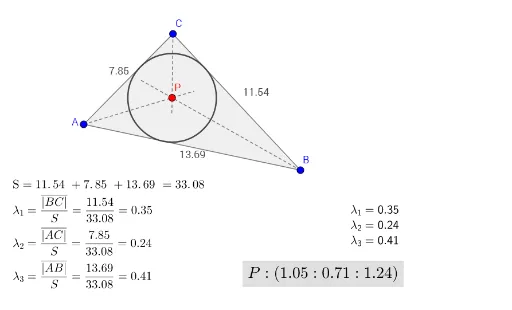
This example demonstrates the midpoint of the incircle of a triangle. Key mathematical concepts include triangles, incircles, and their properties. Using GeoGebra commands such as Invert, Incircle, and Center, the incircle is constructed and its midpoint is found. Suitable for middle school and above students to learn geometric construction and related concepts.
GeoGebra Commands & Parameters
Invert(MM) → matrix_1Incircle(A, B, C) → eCenter(e) → PAngularBisector(A, B, C) → lAngularBisector(B, A, C) → kSegment(A, B) → gSegment(C, A) → fElement(LL, 1, 1) → λ_1Segment(B, C) → hElement(LL, 2, 1) → λ_2Element(LL, 3, 1) → λ_3Polygon(A, B, C) → driehoek1, c, a, bFractionText(λ_1) → tekst1FractionText(λ_2) → tekst3FractionText(λ_3) → tekst4AngularBisector(B, C, A) → mSegment(A, A + (1.25 * Vector[A, P])) → nSegment(B, B + (1.25 * Vector[B, P])) → pSegment(C, C + (1.25 * Vector[C, P])) → q
AI Drawing Prompt Reference
Draw a triangle and construct its incircle, which is tangent to all three sides. Locate the center of the incircle. From each vertex, draw a ray through the center and extend it beyond the center, creating three segments from vertices to the center. Also draw the three internal angle bisectors of the triangle, which meet at the incircle center. Label the incircle center and display fractional values related to the angle bisectors.
The prompt above was compiled from the original drawing commands and is for reference only.