
IM Alg2.1.6 Lesson: Representing Sequences
Loading the math board and drawing, please wait…
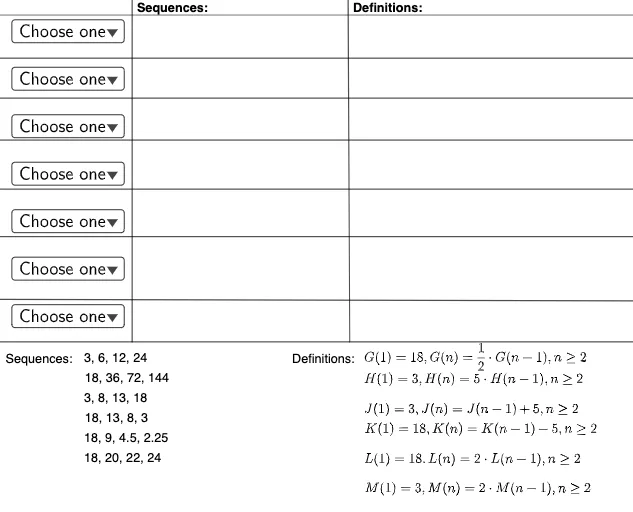
This GeoGebra example demonstrates how to represent sequences visually using geometric figures such as equilateral triangles, incircles, and areas. It illustrates the connection between natural numbers, addition, and sequence representation through geometric constructions. The core mathematical concepts include sequences, recursive and explicit formulas, and the use of geometric shapes to model numerical patterns. The construction uses GeoGebra commands like SelectedElement, Line, Point, and Ray, along with multiple text objects (text1 to text16), function objects (f1, f2, f, g), an input box (InputBox3), and lists (L1 to L9, LL1 to LL3). Points A, B, C, D, E, F and line L are used to build the geometric framework. This resource is suitable for high school algebra or precalculus courses, helping students understand different ways to represent sequences (lists, formulas, graphs) and their geometric interpretations. It can be used for classroom instruction or independent exploration.
GeoGebra Commands & Parameters
SelectedElement(L) → InputBox3Line(A, B) → fLine(C, D) → gLine(E, F) → hLine(G, H) → iLine(I, J) → jLine(K, M) → kLine(N, O) → lPoint(l) → PRay(P, Q) → mPoint(l) → RPoint(f) → SRay(R, S) → nPoint(m) → TPoint(n) → ULine(T, U) → p
AI Drawing Prompt Reference
Create a geometric sequence diagram with three parallel horizontal lines as the base framework. Place points on each line and draw rays from these points, then connect points on the rays to form triangles. Include several equilateral triangles with incircles, using distinct colors or line styles to differentiate layers. Annotate numbers or areas to show the sequence progression. Arrange the shapes left to right to illustrate the relationship between increasing natural numbers and geometric area changes.
The prompt above was compiled from the original drawing commands and is for reference only.