
IM 8.8.6: Constructing Triangle Side Lengths
Loading the math board and drawing, please wait…
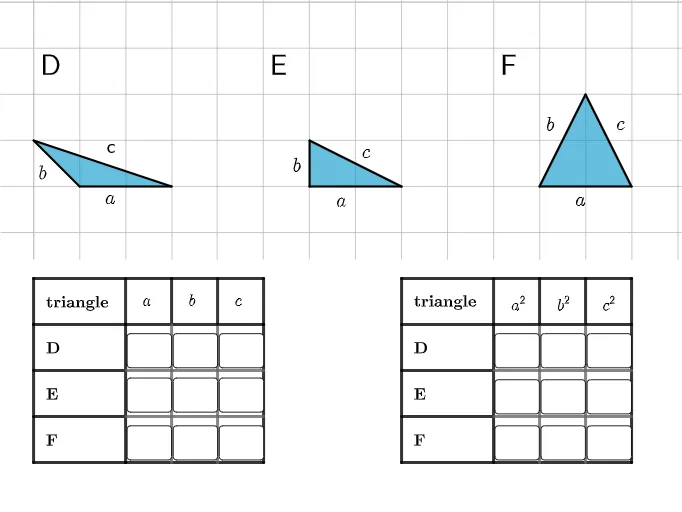
This example demonstrates how to determine unknown side lengths of a triangle using dynamic geometric construction and intersection-based positioning of key points. It focuses on core geometry ideas such as triangle relationships, segment measures, and turning given conditions into measurable constraints by locating intersection points. The construction is built using GeoGebra commands including Polygon (to form the geometric framework), Segment (to represent triangle sides and auxiliary lengths), Point (to define vertices and constructed points like A, B, C and others), Intersect (to compute intersection points that fix the unknown endpoints/lengths), and Textfield/Text (to label the intermediate results and final lengths). The activity is intended for middle-school mathematics learning and classroom demonstrations, helping students connect geometric reasoning with explicit constructed measurements.
GeoGebra Commands & Parameters
Polygon(M, N, O) → t1, o, m_1, n_1Polygon(P, Q, R) → t2, r, p, qPolygon(J, S, T) → t3, t, j, sSegment(C_1, B_1) → gSegment(D_1, C_1) → hSegment(E_1, F_1) → kSegment(D_1, G_1) → lSegment(G_1, H_1) → mSegment(H_1, I_1) → nPoint(l) → J_1Segment(J_1, K_1) → aPoint(l) → L_1Segment(L_1, M_1) → bSegment(H_1, N_1) → cSegment(C_1, O_1) → dPoint(h) → P_1Point(c) → Q_1Segment(P_1, Q_1) → ePoint(h) → R_1Point(c) → S_1Segment(M_1, U_1) → h_1Segment(Z_1, A_2) → k_1Segment(B_2, C_2) → p_1Point(k_1) → K_2Point(k_1) → L_2Segment(K_2, J_2) → t_1Point(p_1) → M_2Segment(L_2, M_2) → a_1Segment(P_1, N_2) → b_1Intersect(p_1, a_1) → Z_2Segment(Z_2, A_3) → e_1Intersect(h, l) → A_1Segment(A_1, V_1) → fSegment(V_1, W_1) → iSegment(D_2, F_2) → i_1Segment(O_2, R_2) → j_1Segment(D_2, S_2) → l_1Point(p_1) → T_2Segment(T_2, B_3) → q_1Segment(S_2, C_3) → r_1Point(j_1) → E_3Segment(D_3, E_3) → s_1Point(r_1) → F_3Segment(E_3, F_3) → c_1Intersect(f_2, j_1, (0, 0)) → G_3Point(r_1) → H_3Segment(G_3, H_3) → d_1Intersect(f_1, h, (0, 0)) → J_3Polygon(K_3, L_3, M_3, N_3) → q1, k_3, l_3, m_3, n_3Point(i) → O_3Segment(O_3, P_3) → h_2Segment(P_3, Q_3) → i_2Intersect(n, a) → R_3Segment(R_3, S_3) → j_2Point(i_1) → T_3Segment(T_3, U_3) → k_2Segment(U_3, V_3) → l_2Textfield(f_1) → InputBox1Textfield(f_2) → InputBox2Textfield(f_{3}) → InputBox3Textfield(f_{4}) → InputBox4Textfield(f_{5}) → InputBox5Textfield(f_{6}) → InputBox6Textfield(f_{7}) → InputBox7Textfield(f_{8}) → InputBox8Textfield(f_{9}) → InputBox9Textfield(g_1) → InputBox10Textfield(g_2) → InputBox11Textfield(g_{3}) → InputBox12Textfield(g_{4}) → InputBox13Textfield(g_{5}) → InputBox14Textfield(g_{6}) → InputBox15Textfield(g_{8}) → InputBox17Textfield(g_{9}) → InputBox18Textfield(g_{7}) → InputBox16
AI Drawing Prompt Reference
Create a plane diagram featuring a main triangle formed by connecting three initial vertices, plus additional auxiliary polygon/triangle shapes built from other groups of three points. Construct several segment portions taken from the triangle sides and use intersecting lines to locate key points that fix unknown endpoints. From these intersection-determined points, draw further segments and connect selected points in sequence so the resulting lines are constrained by the shared intersections. Include length readouts/labels for the relevant constructed segments, using a workflow of segment extraction, intersection placement, and repeated segment connections to support determining unknown triangle side lengths.
The prompt above was compiled from the original drawing commands and is for reference only.