
Are Triangles Congruent? Construction-Based Proof Task
Loading the math board and drawing, please wait…
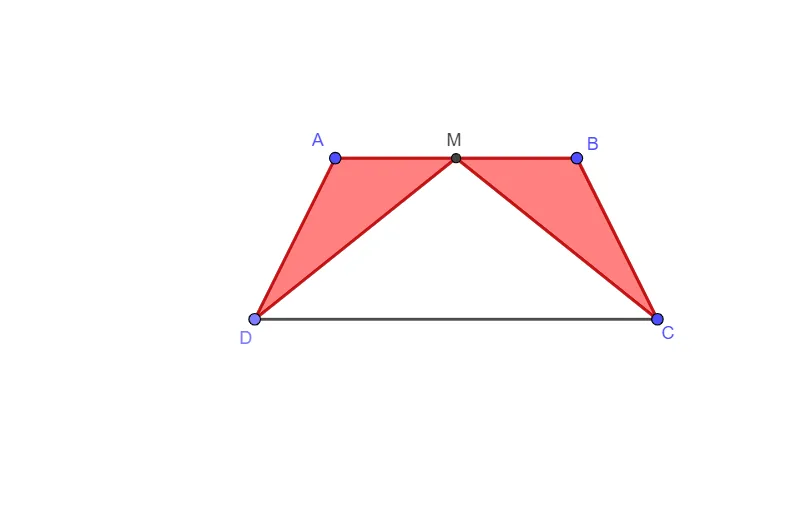
This GeoGebra example demonstrates how to assess whether two triangles are congruent by guiding a construction-driven proof workflow. It focuses on congruence reasoning (e.g., SSS/SAS/ASA-style logic), using geometric relationships involving corresponding sides and midpoints, and verifying that the required measurements remain consistent. The construction relies on GeoGebra commands Segment, Line, Point, Midpoint, and Polygon to create triangle vertices and edges, generate a midpoint (for capturing symmetry or distance relations), build auxiliary lines as measurement references, and assemble triangles using Polygon so that congruence conditions can be checked. The objects named in the construction summary (e.g., points A, B, C, D, midpoint M, and additional auxiliary entities such as f, g, h, i, j, k, l) support the task of matching key geometric elements during the congruence assessment. Suitable for middle/high school geometry lessons, interactive practice, and classroom or assignment evaluation.
GeoGebra Commands & Parameters
Segment(A, B) → fLine(C, f) → gPoint(g) → DMidpoint(f) → MSegment(D, C) → hSegment(A, D) → iSegment(B, C) → jSegment(M, D) → kSegment(M, C) → lPolygon(A, M, D) → t1, d, a, mPolygon(B, M, C) → t2, c, b, m_1
AI Drawing Prompt Reference
Create a planar construction for checking congruence using midpoints. Start by drawing the segment between points A and B. Use this segment as the reference to construct the line through point C, then place point D on that line. Compute the midpoint M of segment AB. Next draw the segments DC, AD, and BC, and also draw segments MD and MC to serve as distance/relationship references. Finally, draw polygon triangle A–M–D and polygon triangle B–M–C, keeping M as the common vertex so the corresponding sides and lengths can be compared.
The prompt above was compiled from the original drawing commands and is for reference only.