
IM 6.4.2 Practice: Meanings of Division
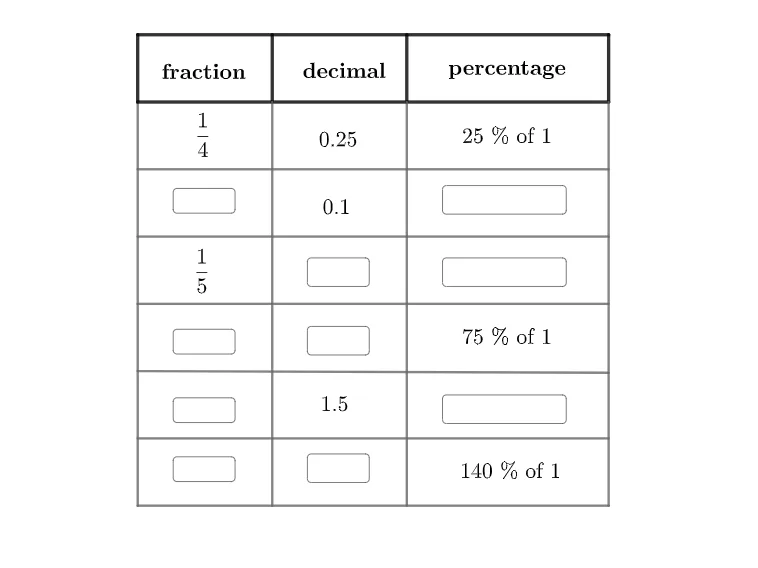
Loading the math board and drawing, please wait…
This example illustrates the meanings of division. Key mathematical concepts include division, fractions, and ratios. Using GeoGebra commands such as Segment, Point, and Textfield, users can construct division-related geometric figures. Suitable for middle school mathematics education.
GeoGebra Commands & Parameters
Segment(B, C) → gSegment(C, D) → hSegment(D, A) → iPoint(g) → EPoint(i) → FSegment(E, F) → jPoint(g) → GPoint(i) → HSegment(G, H) → kSegment(B, I) → lSegment(C, J) → mSegment(J, I) → nPoint(l) → KPoint(m) → LSegment(K, L) → pPoint(l) → NSegment(M, N) → qPoint(l) → OPoint(m) → PSegment(O, P) → rPoint(m) → QSegment(Q, R) → sPoint(l) → SSegment(S, T) → tPoint(n) → USegment(E, U) → aPoint(n) → VSegment(G, V) → bSegment(W, Z) → cTextfield(f) → InputBox1Textfield(f1) → InputBox2Textfield(f2) → InputBox3Textfield(f3) → InputBox4Textfield() → InputBox5Textfield() → InputBox6Textfield() → InputBox7Textfield() → InputBox8Textfield() → InputBox9Textfield() → InputBox10
AI Drawing Prompt Reference
Draw a triangle formed by three line segments, then mark points on the segments and connect them to form new segments. Next, mark the midpoint of one side of the triangle and connect it to a point on the opposite side. Finally, add multiple text boxes to input and display mathematical expressions, illustrating the meanings of fractions and ratios.
The prompt above was compiled from the original drawing commands and is for reference only.