
IM 6.2.4 Lesson: Color Mixtures
Loading the math board and drawing, please wait…
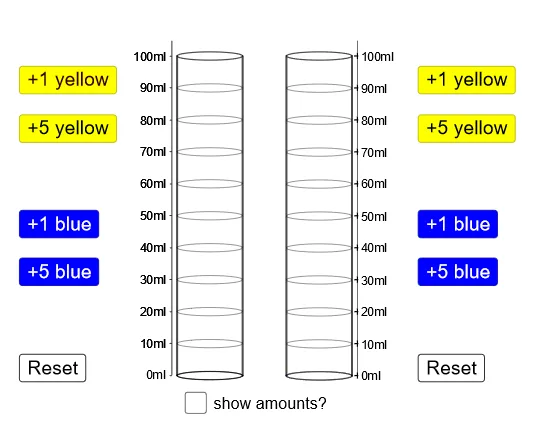
This example demonstrates the principle of color mixing, involving the concept of ratios. Using GeoGebra commands such as Ellipse, Point, If, Segment, etc., a dynamic model of color mixing can be constructed. Suitable for middle school students to learn about ratios and color theory.
GeoGebra Commands & Parameters
Ellipse((1, 0), (2.5, 0), 1.5) → ePoint(e) → FIf(yellow + blue ≟ 0, 1, If[ratio ≤ 1, 0, (0.79 * ratio2^(2)) - (1.72 * ratio2) + 0.99]) → aIf(yellow + blue ≟ 0, 1, If[ratio ≥ 1, 1, (-0.85 * ratio^(2)) + (1.78 * ratio)]) → bIf(yellow + blue ≟ 0, 1, If[ratio ≥ 1, 0, (0.79 * ratio^(2)) - (1.72 * ratio) + 0.99]) → cPoint(e) → ESegment(F, (x(F), ht)) → fVector(F, G) → uTranslate(e, u) → e'Polygon(G, F, E, H) → poly2, g, f_1, e_1, hSegment(I, F) → iSegment(E, J) → jVector(F, I) → vEllipse((1, ht), (2.5, ht), 1.5) → pEllipse((1, 0), (2.5, 0), 1.5) → qSegment(H, E) → lEllipse((1, top), (2.5, top), 1.5) → kSegment(C, A) → mSegment(B, D) → nVector(A, C) → wVector(A, K) → rTranslate(B, r) → B'Polygon(K, A, B, B') → poly1, k_1, a_1, b_1, b'If(yellow2 + blue2 ≟ 0, 1, If[ratiox ≤ 1, 0, (0.79 * (1 / ratiox)^(2)) - (1.72 * 1 / ratiox) + 0.99]) → a2If(yellow2 + blue2 ≟ 0, 1, If[ratiox ≥ 1, 1, (-0.85 * ratiox^(2)) + (1.78 * ratiox)]) → b2If(yellow2 + blue2 ≟ 0, 1, If[ratiox ≥ 1, 0, (0.79 * ratiox^(2)) - (1.72 * ratiox) + 0.99]) → c2Vector(F, A) → dTranslate(q, d) → q'Translate(q, d) → q'_1Translate(q'_1, r) → sTranslate(q'_1, r) → tSegment(B', B) → g_1Segment(K, A) → h_1Sequence(Ellipse[(1, k), (2.5, k), 1.5], k, 10, 90, 10) → list1Translate(list1, d) → list1'Ray((8.5, 0), (8.5, 1)) → i_1Sequence((8.5, n), n, 0, 100, 10) → list2Point(i_1) → LSequence(Text[m + "ml", (8.65, m - 1.5)], m, 0, 100, 10) → list3Polygon(M, N, O, P) → poly3, m_1, n_1, o, p_1
AI Drawing Prompt Reference
Draw a dynamic color mixing model with two ellipses, one at the bottom and another at the top. Adjust the ratio to change the color of the ellipses. Use points and segments to connect the ellipses and show the color mixing effect at different ratios. Finally, add scale lines and text labels to indicate the amount of color mixture in milliliters.
The prompt above was compiled from the original drawing commands and is for reference only.