
Identifying Trig Ratios: Quick Formative Assessment by Dan Dale
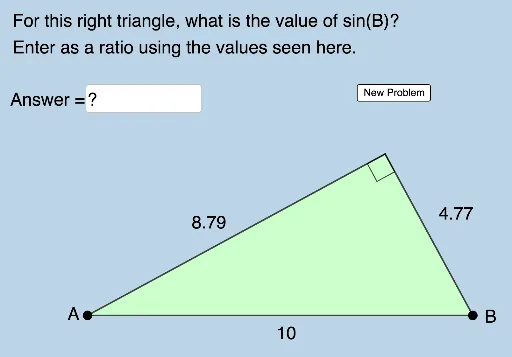
Loading the math board and drawing, please wait…
This example demonstrates how to identify trigonometric ratios through geometric construction. Core math concepts include trigonometry, sine, and cosine in right triangles. GeoGebra commands used include Random, Segment, Semicircle, etc. Suitable for middle school and above students for trigonometry learning and self-assessment.
GeoGebra Commands & Parameters
Random(5, 10) → dSegment(B, A) → hSemicircle(A, B) → cRotate(B, (Random[30, 150] * π / 180), Midpoint[A, B]) → B'_2Segment(A, B'_2) → fRandom(30, 150) → aSegment(B'_2, B) → gRandom(1, 6) → nElement(L_1, n) → text1Textfield(b) → InputBox1Polygon(A, B'_2, B) → t1, b_1, a_1, b'_2Angle(A, B'_2, B) → αAngle(B'_2, B, A) → βAngle(B, A, B'_2) → γ
AI Drawing Prompt Reference
Draw a right triangle ABC with AB as the hypotenuse, BC as one leg, and AC as the other leg. Randomly rotate point B to get point B', then draw line segment AB'. Randomly generate an angle inside the triangle and draw line segment B'B. Randomly generate a number inside the triangle and create a text prompt based on that number. Draw the circumcircle of triangle ABC.
The prompt above was compiled from the original drawing commands and is for reference only.