
Identify Fractions
Loading the math board and drawing, please wait…
In collections
Fractions الكسور
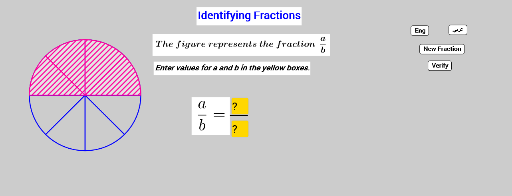
This example demonstrates interactive fraction identification through geometric representations. It involves core math concepts like fraction notation, geometric partitioning, and random variable generation. Constructed using GeoGebra commands like Random, Sequence, Textfield, Segment, If, and objects such as Vertices, Denom, Num. Suitable for middle school mathematics education, aiding in visual understanding and practice of fraction concepts.
GeoGebra Commands & Parameters
Random(2, 9) → bRandom(1, b) → aSequence(Rotate[B, (k * alpha), A], k, 0, b) → VerticesSequence(CircleSector[A, Element[Vertices, k], Element[Vertices, k + 1]], k, 1, b) → DenomSequence(CircleSector[A, Element[Vertices, k], Element[Vertices, k + 1]], k, 1, a) → NumTextfield(c) → InputBox1Textfield(d) → InputBox2Segment(C, D) → eIf(Arab, "جوابٌ خاطئ", "Bad Answer") → BadIf(Eng, "Good Answer", "جواب صائب") → GoodIf((a * d) ≟ (b * c), Good, Bad) → EvalSegment(G, H) → fSegment(E, F) → g
AI Drawing Prompt Reference
Draw a circle divided into several equal sectors, with a portion of the sectors shaded to represent a fraction. Place two input boxes outside the circle for entering numerator and denominator. Below the circle, draw a horizontal segment to suggest a fraction bar. Add two vertical segments on either side of the figure for labeling or decoration. The layout should clearly illustrate fraction concepts and include interactive elements for user input.
The prompt above was compiled from the original drawing commands and is for reference only.