
Identify Complementary and Supplementary Angles
Loading the math board and drawing, please wait…
In collections
Besondere Winkelpaare
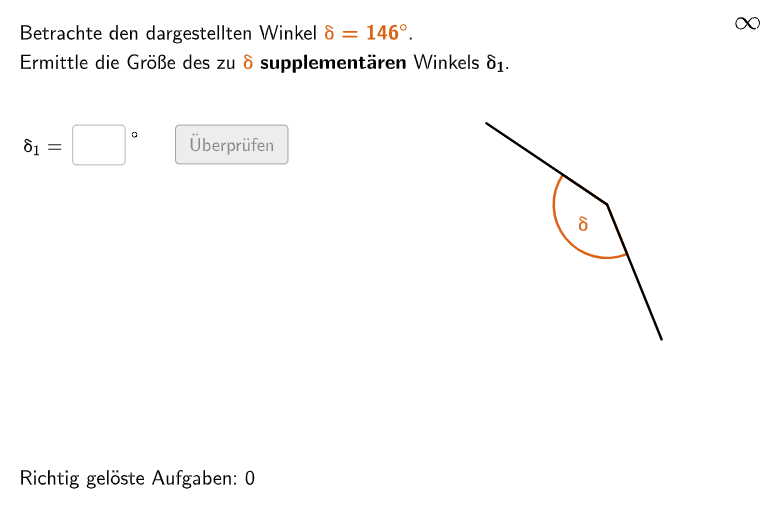
This example demonstrates how to identify complementary and supplementary angles. Key mathematical concepts include angle classification and measurement. It uses GeoGebra commands such as Angle and Segment for geometric construction. Suitable for 5-6 grade students to learn about angle classification and measurement.
GeoGebra Commands & Parameters
Flatten(Sequence[Shuffle[{1, 1, 2, 2}], i, 1, 25]) → randomNumbersTypeElement(randomNumbersType, Mod[questionCount, Length[randomNumbersType]] + 1) → randomTypeJoin({Shuffle[25…60], Shuffle[25…60]}) → randomNumbersKomJoin({Shuffle[25…150], Shuffle[25…150]}) → randomNumbersSupIf(randomType ≟ 1, Element[randomNumbersKom, Mod[questionCount, Length[randomNumbersKom]] + 1], Element[randomNumbersSup, Mod[questionCount, Length[randomNumbersSup]] + 1]) → randomAngleIf(randomType ≟ 1, 90 - randomAngle, 180 - randomAngle) → randomAngle2Flatten(Sequence[Shuffle[{"α", "β", "γ", "δ", "ε"}], i, 1, 20]) → randomLettersElement(randomLetters, Mod[questionCount, Length[randomLetters]] + 1) → randomLetterDefined(input) → clickableBtnValidateTextfield(input) → inputBoxRotate(AngleRef, (randomAngle° * Random[1, 4]), AngleCenter) → AngleStartRotate(AngleStart, randomAngle°, AngleCenter) → AngleEndAngle(AngleStart, AngleCenter, AngleEnd) → angleSegment(AngleCenter, AngleStart) → angleStartLineSegment(AngleCenter, AngleEnd) → angleEndLineRotate(AngleStart, If[randomType ≟ 1, 90°, 180°], AngleCenter) → AngleHintAngle(AngleStart, AngleCenter, AngleHint) → angleHintSegment(AngleCenter, AngleHint) → angleHintLineAngle(AngleEnd, AngleCenter, AngleHint) → angle2
AI Drawing Prompt Reference
Draw a diagram with two angles, one of which is complementary or supplementary to the other. One angle is between 25 and 60 degrees, and the other is between 25 and 150 degrees. The two angles share the same center point. Draw the starting and ending lines of the two angles, as well as a hint line indicating which angle is complementary or supplementary to the other.
The prompt above was compiled from the original drawing commands and is for reference only.