
Hyperbola Visualization
Loading the math board and drawing, please wait…
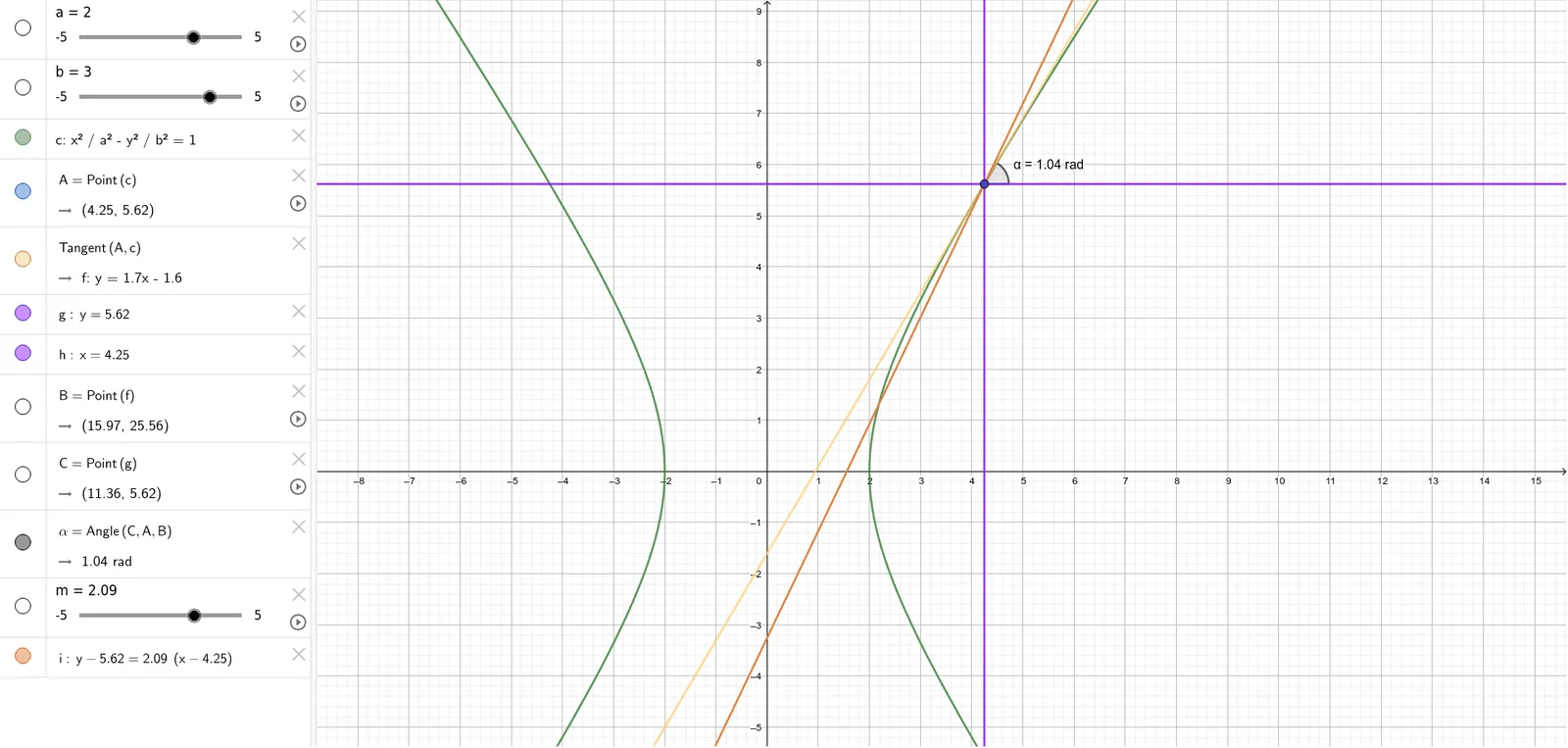
This example demonstrates the dynamic behavior of a hyperbola and its related geometric elements. Key math concepts include hyperbola definition, scatter plot, matrix operations, real numbers, kite properties, and percentage calculations. Construction highlights involve GeoGebra commands like Point, Tangent, Angle, and objects such as a, b, c, A, f, g, h, B, C, α, m, i. Suitable for high school mathematics education to understand hyperbola geometry and parameter effects.
GeoGebra Commands & Parameters
Point(c) → ATangent(A, c) → f,Point(f) → BPoint(g) → CAngle(C, A, B) → α
AI Drawing Prompt Reference
Draw a hyperbola and demonstrate its dynamic behavior along with related geometric elements. Start by identifying a focus, then draw a tangent line from the focus, and mark the intersection point of the tangent with the hyperbola. Next, draw a line perpendicular to the tangent from this intersection point to find another key point. Finally, calculate and display the angle formed between these two points and the focus, clearly illustrating the geometric properties and parameter effects of the hyperbola.
The prompt above was compiled from the original drawing commands and is for reference only.