
Hyperbola Generator
Loading the math board and drawing, please wait…
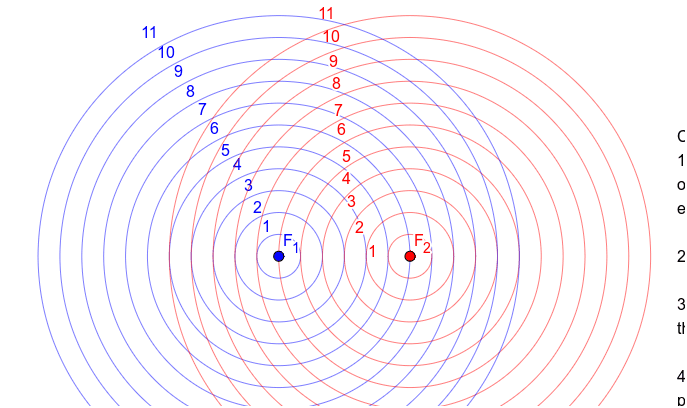
This example demonstrates the generation of a hyperbola. Key mathematical concepts include the definition of a hyperbola, the reflection property of its foci, and the use of piecewise functions. Using GeoGebra commands such as Circle and Intersection, the dynamic construction of the hyperbola is shown. Suitable for high school mathematics education, particularly in coordinate geometry and function graphing.
GeoGebra Commands & Parameters
Circle(F_1, 1) → cCircle(F_1, 2) → dCircle(F_1, 3) → eCircle(F_1, 4) → fCircle(F_1, 5) → gCircle(F_1, 6) → hCircle(F_1, 7) → kCircle(F_1, 8) → pCircle(F_1, 9) → qCircle(F_2, 1) → rCircle(F_2, 2) → sCircle(F_2, 3) → tCircle(F_2, 4) → c_1Circle(F_2, 5) → d_1Circle(F_2, 6) → e_1Circle(F_2, 7) → f_1Circle(F_2, 8) → g_1Circle(F_2, 9) → h_1Circle(F_2, 10) → k_1Circle(F_2, 11) → p_1Circle(F_1, 10) → q_1Circle(F_1, 11) → r_1
AI Drawing Prompt Reference
Draw a hyperbola using two foci F1 and F2. First, draw circles with radii 1, 2, 3, 4, 5, 6, 7, 8, and 9 around F1, and then draw circles with radii 1, 2, 3, 4, 5, 6, 7, 8, 9, 10, 11, and 12 around F2. These circles will help dynamically construct the hyperbola.
The prompt above was compiled from the original drawing commands and is for reference only.