
Hyperbola Eccentricity Dynamic Demo
Loading the math board and drawing, please wait…
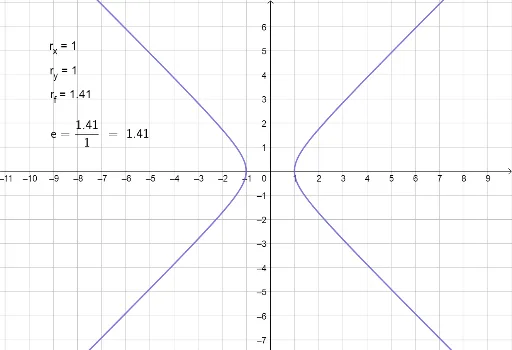
①This GeoGebra example dynamically demonstrates the geometric meaning of the eccentricity of a hyperbola, showing how changes in eccentricity affect the shape of the curve. ②The core mathematical concept is the eccentricity of a hyperbola, defined as the ratio of the focal distance to the semi-transverse axis (e = c/a), which determines the openness of the branches; it also involves the standard equation, foci, transverse axis, and conjugate axis of the hyperbola. ③Construction highlights: from the summary, objects such as r_x, r_y, c, r_f, e_c, and text1–text4 are used; likely sliders control the semi-transverse axis r_x and semi-conjugate axis r_y, the focal distance c is computed as √(r_x²+r_y²), then eccentricity e_c = c/r_x is calculated and displayed via text objects; the construction leverages GeoGebra's linked algebra and geometry views to update the graph and numerical values synchronously as parameters change. ④This is suitable for high-school analytic geometry lessons or introductory college math review, useful for classroom demonstrations of how eccentricity relates to hyperbola shape, and as an interactive exploration tool for students.
GeoGebra Commands & Parameters
Numeric r_{x}(1)Numeric r_{y}(1)x^(2) / r_{x}^(2) - y^(2) / r_{y}^(2) = 1sqrt(r_{x}^(2) + r_{y}^(2))r_{f} / r_{x}
AI Drawing Prompt Reference
Draw a dynamic demonstration of a hyperbola. Include the hyperbola equation, foci, transverse axis, and conjugate axis, along with text labels for focal distance and eccentricity. Users can adjust the lengths of the transverse and conjugate axes to change the shape and eccentricity of the hyperbola. The diagram should clearly show how eccentricity affects the openness of the branches.
The prompt above was compiled from the original drawing commands and is for reference only.