
Horizontal Hyperbola
Loading the math board and drawing, please wait…
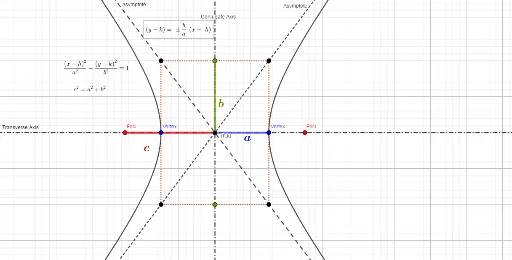
This example demonstrates a horizontal hyperbola. It involves the basic properties and construction of hyperbolas. Using GeoGebra commands such as Intersect, Point, and Hyperbola, a series of points on the hyperbola can be constructed. Suitable for high school mathematics education, particularly in coordinate geometry and conic sections.
GeoGebra Commands & Parameters
Intersect(xAxis, yAxis) → APoint(xAxis) → BPoint(xAxis) → CPoint(xAxis) → DHyperbola(B, C, D) → cPolygon(E, F, G, H) → q1, e, f, g, hIntersect(c, f, 1) → ILine(E, G) → iLine(F, H) → jLine(C, B) → kSegment(A, C) → lSegment(A, I) → mPoint(e) → JSegment(J, A) → nLine(J, A) → pIntersect(p, g) → K
AI Drawing Prompt Reference
Draw a horizontal hyperbola by first taking four points B, C, and D on the x-axis and constructing the hyperbola c using these points. Then draw a rectangle q1, and mark the intersection point I of the hyperbola c and the rectangle q1. Draw lines i and j through the diagonal vertices E and F of the rectangle. Draw line k through points C and B. Then draw line segments l and m connecting point A to C and point A to I, respectively. Finally, draw line segments n and p through point J and A, and mark the intersection point K of line p and line g.
The prompt above was compiled from the original drawing commands and is for reference only.