
Hannah's Introduction to GeoGebra: Constructions of Angles
Loading the math board and drawing, please wait…
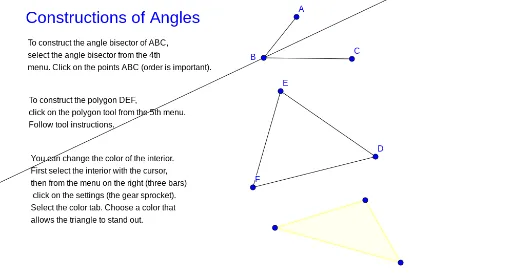
① This example demonstrates how to construct angles, triangles, parallelograms, and other plane figures using GeoGebra's basic construction tools, with a focus on angle bisectors and polygon creation. ② Core mathematical concepts include the definition and construction of angles, angle bisectors, scalene triangles, parallelograms, properties of plane figures, and geometric terminology. ③ Construction details: Based on the summary, the example uses GeoGebra commands such as Segment, AngularBisector, and Polygon, along with multiple text labels (text1–text4) and points (A, B, C, D, E, F, G, H, I) as well as segments (h, i, j, k, l, f, g, h_1), providing an interactive step-by-step geometric construction. ④ Suitable for middle or high school students first learning GeoGebra, or for teachers demonstrating geometric constructions in class to help students understand angles, triangles, and parallelograms.
GeoGebra Commands & Parameters
Segment(A, B) → hSegment(C, B) → iSegment(D, E) → jSegment(E, F) → kSegment(F, D) → lAngularBisector(A, B, C) → fPolygon(G, H, I) → t1, i_1, g, h_1
AI Drawing Prompt Reference
Draw triangle ABC with the angle bisector of angle ABC intersecting at point F. Then draw triangle GHI. Make sure all segments and angle bisectors are correctly connected.
The prompt above was compiled from the original drawing commands and is for reference only.