
Golden Rectangles
Loading the math board and drawing, please wait…
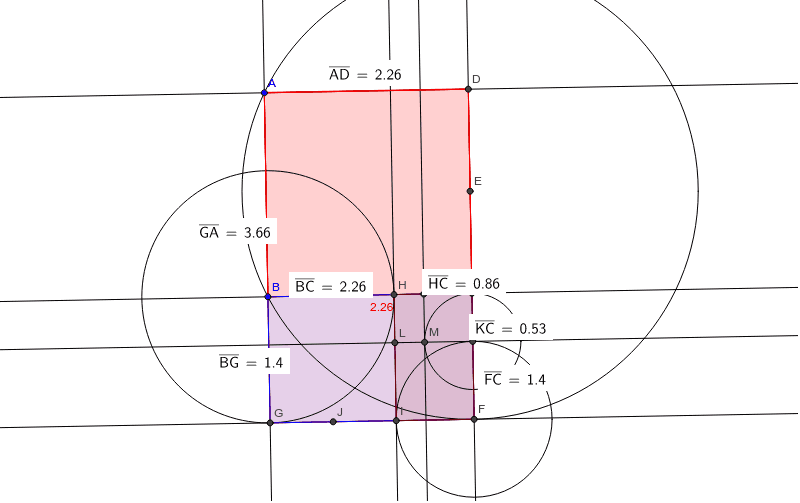
This example demonstrates the construction of golden rectangles, which are special rectangles with a length-to-width ratio of the golden ratio. Key construction steps include using the Polygon command to draw the rectangle, the Midpoint and Line commands to find the midpoints and perpendicular bisectors of the sides, and the Distance command to measure the lengths of the sides. Suitable for middle school and above students to learn geometric construction and ratio concepts.
GeoGebra Commands & Parameters
Polygon(A, B, 4) → poly1, a, b, c, d, C, DLine(A, B) → eLine(C, D) → fLine(A, D) → gLine(B, C) → hMidpoint(D, C) → ECircle(E, B) → kIntersect(k, f, 1) → FOrthogonalLine(F, f) → iIntersect(e, i) → GPolygon(A, G, F, D) → poly2, a_1, g_1, f_1, d_1Distance(G, A) → distanceGADistance(A, D) → distanceADCircle(B, G) → pIntersect(p, h, 2) → HOrthogonalLine(H, b) → jIntersect(i, j) → IDistance(B, G) → distanceBGDistance(B, C) → distanceBCMidpoint(G, I) → JCircle(F, I) → qIntersect(q, f, 2) → KOrthogonalLine(K, f) → lIntersect(j, l) → LDistance(F, C) → distanceFCDistance(H, C) → distanceHCDistance(H, C) → HCPolygon(B, G, F, C) → poly3, b_1, g_2, f_2, c_1Polygon(H, I, F, C) → poly4, h_1, i_1, f_3, c_2Circle(K, C) → rIntersect(r, l, 2) → MOrthogonalLine(M, l) → mIntersect(h, m) → NDistance(K, C) → distanceKC
AI Drawing Prompt Reference
Draw a figure consisting of two nested golden rectangles. Start by constructing a rectangle, find the midpoints of its sides and draw perpendicular bisectors. Use circles and intersections to locate new vertices, forming an inner golden rectangle. Measure and label the lengths of the sides to demonstrate the ratio of length to width is the golden ratio.
The prompt above was compiled from the original drawing commands and is for reference only.