
Geometric Verification of the Triangle’s Interior Angle Sum
Loading the math board and drawing, please wait…
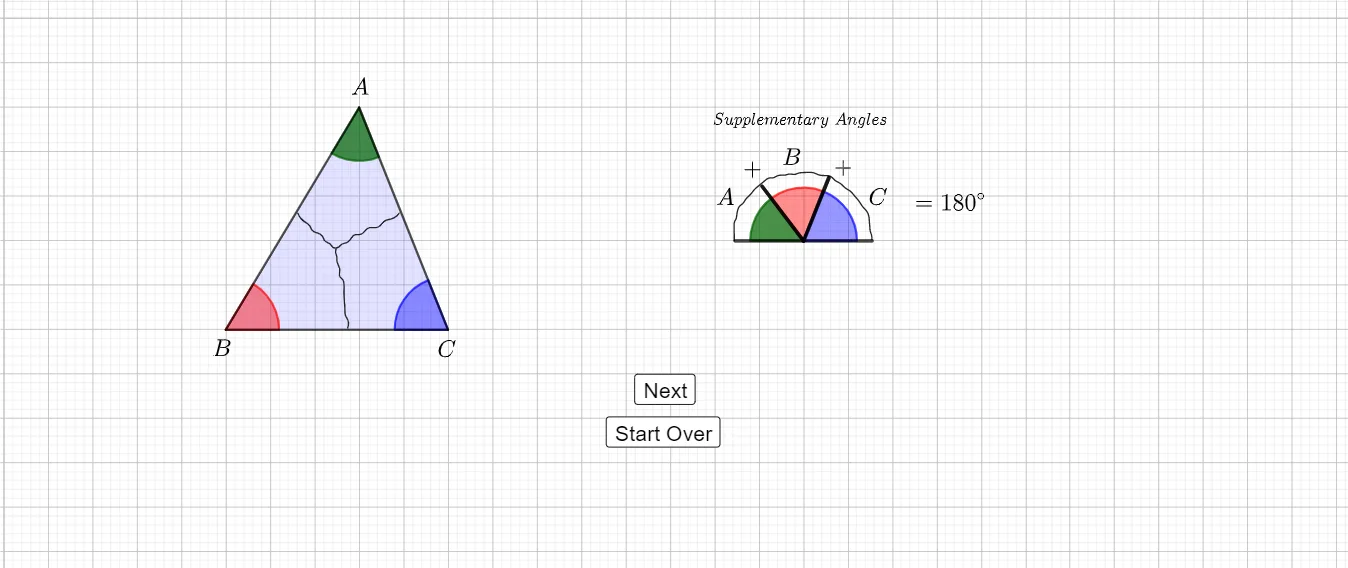
This GeoGebra example dynamically constructs and measures the three interior angles of a triangle to visually confirm the invariant fact that the sum of a triangle’s interior angles is always 180°. It focuses on the key ideas of angle measure, interior angles, and geometric proof/verification through construction. The construction uses GeoGebra tools such as Point to define vertices and auxiliary points, Polygon to form triangle ABC, InteriorAngles to generate angles α, β, and γ, Segment to build the angle boundaries, CircleSector to visualize/mark angle regions, and Rotate to support alignment/animation of the constructed angles. Suitable for middle and high school geometry lessons and for interactive exploration where students can test and understand the interior angle sum theorem in a hands-on way.
GeoGebra Commands & Parameters
Point(yAxis) → APolygon(A, B, C) → t1, c, a, bInteriorAngles(t1) → α, β, γSegment(D, E) → fPoint(f) → FCircleSector(A, (x(A) + (1.2 * cos(360° - α - γ)), y(A) + (1.2 * sin(360° - α - γ))), (x(A) + (1.2 * cos(360° - γ)), y(A) + (1.2 * sin(360° - γ)))) → dCircleSector(C, (x(C) + (1.2 * cos(180° - γ)), y(C) + (1.2 * sin(180° - γ))), (x(C) + (1.2 * cos(180°)), y(C) + (1.2 * sin(180°)))) → gCircleSector(B, (x(B) + (1.2 * cos(0°)), y(B) + (1.2 * sin(0°))), (x(B) + (1.2 * cos(β)), y(B) + (1.2 * sin(β)))) → ePoint(t1) → JPoint(t1) → KPoint(t1) → LPoint(t1) → MPoint(t1) → NPoint(t1) → OSegment(A, J) → iSegment(A, K) → jSegment(B, L) → lSegment(B, M) → mSegment(C, O) → nSegment(C, N) → rRotate(Rotate[d, ((-h_1) * 180°), Midpoint[A, F]], (h_1 * γ), F) → kRotate(Rotate[e, (h_2 * 180°), Midpoint[B, F]], ((-h_2) * (180° - γ)), F) → pRotate(Segment[Rotate[B, (h_2 * 180°), Midpoint[B, F]], Rotate[L, (h_2 * 180°), Midpoint[B, F]]], ((-h_2) * (180° - γ)), F) → f_1Rotate(Segment[Rotate[B, (h_2 * 180°), Midpoint[B, F]], Rotate[M, (h_2 * 180°), Midpoint[B, F]]], ((-h_2) * (180° - γ)), F) → g_1Rotate(Rotate[g, ((-h_3) * 180°), Midpoint[C, F]], (h_3 * γ), F) → qRotate(Segment[Rotate[C, ((-h_3) * 180°), Midpoint[C, F]], Rotate[O, ((-h_3) * 180°), Midpoint[C, F]]], (h_3 * γ), F) → i_1Rotate(Segment[Rotate[C, ((-h_3) * 180°), Midpoint[C, F]], Rotate[N, ((-h_3) * 180°), Midpoint[C, F]]], (h_3 * γ), F) → hRotate(Segment[Rotate[A, ((-h_1) * 180°), Midpoint[A, F]], Rotate[J, ((-h_1) * 180°), Midpoint[A, F]]], (h_1 * γ), F) → sRotate(Segment[Rotate[A, ((-h_1) * 180°), Midpoint[A, F]], Rotate[K, ((-h_1) * 180°), Midpoint[A, F]]], (h_1 * γ), F) → t
AI Drawing Prompt Reference
Construct a triangle ABC in the plane and outline it as a polygon. Show the three interior angle measures of the triangle as α at vertex A, β at vertex B, and γ at vertex C, including visible angle marks. At each vertex, draw corresponding sector-like arc regions whose boundaries follow the directions of the relevant triangle sides (at A for the sector determined by the α and γ directions, at C for the sector determined by the γ-related directions, and at B for the sector determined by the β direction). Build supporting boundary line segments for these sectors. Then introduce a common reference point F and rotate the sector regions about the appropriate midpoints involving F so that the different angles are visually aligned for comparison.
The prompt above was compiled from the original drawing commands and is for reference only.