
Geometric Transformations Demonstration
Loading the math board and drawing, please wait…
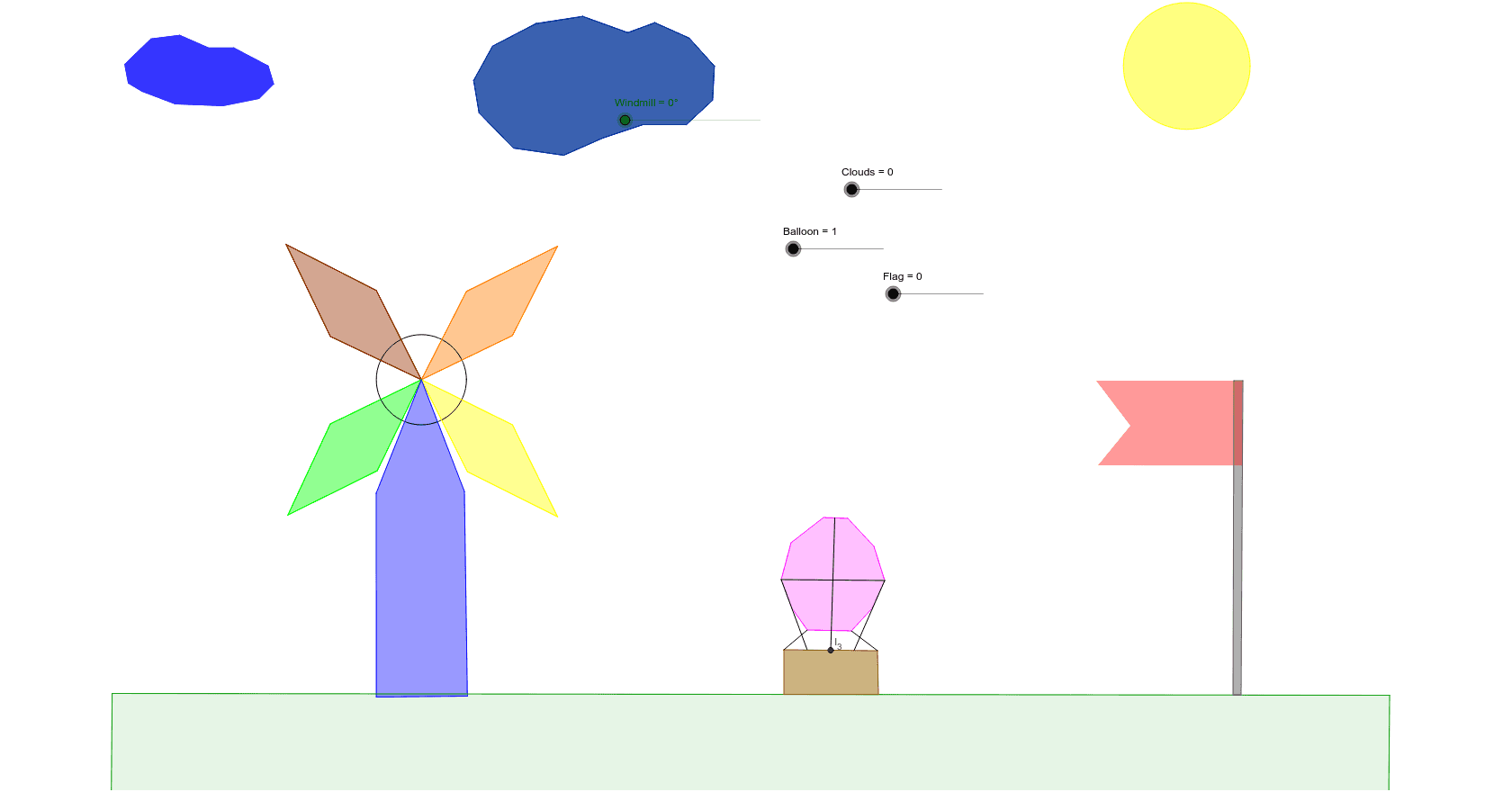
This example demonstrates four types of geometric transformations: reflections, rotations, dilations, and translations, using slider animations. It involves key mathematical concepts such as geometric transformations, vectors, and polygons. Using GeoGebra commands like Mirror, Rotate, Translate, and Dilate, dynamic geometric figures can be constructed. Suitable for students at the junior high school level and above.
GeoGebra Commands & Parameters
Intersect(xAxis, yAxis) → APoint(yAxis) → BCircle(A, B) → cSegment(A, C) → aSegment(C, D) → bSegment(D, E) → dSegment(E, A) → ePolygon(A, C, D, E) → poly1, a_1, c_1, d_1, e_1Rotate(A, Windmill, A) → A'Rotate(C, Windmill, A) → C'Rotate(D, Windmill, A) → D'Rotate(E, Windmill, A) → E'Polygon(A', C', D', E') → poly1', a', c', d', e'Polygon(A, F, G, H) → poly2, a_2, f, g, hPolygon(A, I, J, K) → poly3, a_3, i, j, kPolygon(A, L, M, N) → poly4, a_4, l, m, nRotate(A, Windmill, A) → A'_1Rotate(F, Windmill, A) → F'Rotate(G, Windmill, A) → G'Rotate(H, Windmill, A) → H'Polygon(A'_1, F', G', H') → poly2', a'_1, f', g', h'Rotate(A, Windmill, A) → A'_2Rotate(I, Windmill, A) → I'Rotate(J, Windmill, A) → J'Rotate(K, Windmill, A) → K'Polygon(A'_2, I', J', K') → poly3', a'_2, i', j', k'Rotate(A, Windmill, A) → A'_3Rotate(L, Windmill, A) → L'Rotate(M, Windmill, A) → M'Rotate(N, Windmill, A) → N'Polygon(A'_3, L', M', N') → poly4', a'_3, l', m', n'Polygon(A, O, P, Q, R) → poly5, a_5, o, p, q, r_3Polygon(S, T, U, V) → poly6, s, t, u, vCircle(W, Z) → f_1Polygon(A_1, B_1, K_1, L_1, C_1, D_1, E_1, F_1, G_1, H_1, I_1, J_1) → poly7, a_6, j_1, k_1, l_1, b_1, c_2, d_2, e_2, f_2, g_1, h_1, i_1Polygon(M_1, N_1, W_1, Z_1, A_2, B_2, C_2, O_1, P_1, Q_1, R_1, S_1, T_1, U_1, V_1) → poly8, m_1, v_1, w_1, z_1, a_7, b_2, c_3, n_1, o_1, p_1, q_1, r_1, s_1, t_1, u_1Point(Circle[A, Clouds]) → E_2Segment(A, E_2) → g_2Vector(A, E_2) → zTranslate(A_1, z) → F_2Translate(B_1, z) → G_2Translate(C_1, z) → H_2Translate(D_1, z) → I_2Translate(E_1, z) → J_2Translate(F_1, z) → K_2Translate(G_1, z) → L_2Translate(H_1, z) → M_2Translate(I_1, z) → N_2Translate(J_1, z) → O_2Translate(K_1, z) → P_2Translate(L_1, z) → Q_2Polygon(F_2, G_2, P_2, Q_2, H_2, I_2, J_2, K_2, L_2, M_2, N_2, O_2) → poly7', f_3, o_2, p_2, q_2, g_3, h_2, i_2, j_2, k_2, l_2, m_2, n_2Translate(M_1, z) → R_2Translate(N_1, z) → S_2Translate(O_1, z) → T_2Translate(P_1, z) → U_2Translate(Q_1, z) → V_2Translate(R_1, z) → W_2Translate(S_1, z) → Z_2Translate(T_1, z) → A_3Translate(U_1, z) → B_3Translate(V_1, z) → C_3Translate(W_1, z) → D_3Translate(Z_1, z) → E_3Translate(A_2, z) → F_3Translate(B_2, z) → G_3Translate(C_2, z) → H_3Polygon(R_2, S_2, D_3, E_3, F_3, G_3, H_3, T_2, U_2, V_2, W_2, Z_2, A_3, B_3, C_3) → poly8', r_2, c_4, d_3, e_3, f_4, g_4, h_3, s_2, t_2, u_2, v_2, w_2, z_2, a_8, b_3Point(s) → D_2Point(s) → I_4Polygon(D_2, G_4, H_4, I_4) → poly12, d_5, g_5, h_4, i_4Point(h_4) → M_4Polygon(H_4, J_4, K_4, L_4, M_4) → poly13, h_5, j_4, k_4, l_5, m_4Mirror(H_4, h_4) → N_4Mirror(J_4, h_4) → O_4Mirror(K_4, h_4) → P_4Mirror(L_4, h_4) → Q_4Mirror(M_4, h_4) → R_4Polygon(N_4, O_4, P_4, Q_4, R_4) → poly13', n_4, o_4, p_3, q_4, r_4Point(s) → T_4Point(s) → U_4Polygon(S_4, T_4, U_4, V_4) → poly14, s_4, t_4, u_4, v_4Polygon(W_4, Z_4, A_5, B_5, C_5, D_5, E_5, F_5, G_5, H_5) → poly15, w_4, h_6, z_4, a_{10}, b_5, c_6, d_6, e_5, f_6, g_6Point(h_6) → I_5Dilate(W_4, Balloon, I_5) → J_5Dilate(Z_4, Balloon, I_5) → K_5Dilate(A_5, Balloon, I_5) → L_5Dilate(B_5, Balloon, I_5) → M_5Dilate(C_5, Balloon, I_5) → N_5Dilate(D_5, Balloon, I_5) → O_5Dilate(E_5, Balloon, I_5) → P_5Dilate(F_5, Balloon, I_5) → Q_5Dilate(G_5, Balloon, I_5) → R_5Dilate(H_5, Balloon, I_5) → S_5Polygon(J_5, K_5, L_5, M_5, N_5, O_5, P_5, Q_5, R_5, S_5) → poly15', j_5, s_5, k_5, l_6, m_5, n_5, o_5, p_5, q_5, r_5Segment(S_4, J_5) → b_6Segment(V_4, S_5) → e_6Point(n_5) → V_5Segment(L_5, Q_5) → j_6Midpoint(v_4) → I_3Point(v_4) → J_3Point(v_4) → K_3Segment(L_5, J_3) → i_3Segment(I_3, V_5) → j_3Segment(K_3, Q_5) → k_3
AI Drawing Prompt Reference
Create a geometric transformation demonstration with a circle centered at the origin. Place a point on the circle and construct a polygon from the center to several points on the circle. Add a rotation slider to rotate this polygon around the center, showing the rotated copy. Then add several other polygons, each undergoing a different transformation: one rotated, one translated by a vector, and one dilated by a scale factor. Display all original and transformed shapes together, using distinct colors and labels for each transformation type.
The prompt above was compiled from the original drawing commands and is for reference only.