
Geometric Construction of Ellipse and Circle in GeoGebra
Loading the math board and drawing, please wait…
In collections
Realidades de GeoGebra
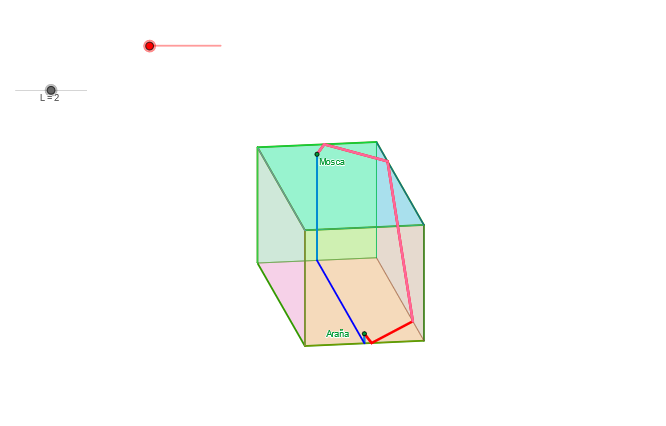
This example demonstrates constructing an ellipse and a circle using GeoGebra, analyzing their geometric properties. Key mathematical concepts include the definition of an ellipse, the equation of a circle, and geometric transformations. Construction steps involve using Ellipse, Circle, Point, and Translate commands, along with Midpoint and Vector for geometric analysis. Suitable for high school students or college freshmen learning coordinate geometry and geometric construction.
GeoGebra Commands & Parameters
Ellipse(O_r - (0.95, 0), O_r + (0.95, 0), 1) → mira1Point(mira1) → AEllipse(O_r - (0, 0.95), O_r + (0, 0.95), 1) → mira2Point(mira2) → Bpunto3d(A, B, M, O_0, O_r, -4, 0.12121212121212122, 1, U, L) → Epunto3d(A, B, M, O_0, O_r, -4, 1, 1, U, L) → V5punto3d(A, B, M, O_0, O_r, 1, -1, 1, U, L) → V3punto3d(A, B, M, O_0, O_r, 1, 1, 1, U, L) → V2Segment(V2, V5) → cubA8Segment(V2, V3) → cubA2punto3d(A, B, M, O_0, O_r, -4, 3, -1, U, L) → Ppunto3d(A, B, M, O_0, O_r, 1, 3, -1, U, L) → WLine(W, P) → l1punto3d(A, B, M, O_0, O_r, -4.166666666666667, 4, -1, U, L) → Cpunto3d(A, B, M, O_0, O_r, 1, 0.12121212121212122, -1, U, L) → DLine(D, C) → f1Intersect(f1, l1) → SLine(S, cubA2) → i1punto3d(A, B, M, O_0, O_r, 1, 1, -1, U, L) → V1Segment(V1, V2) → cubA1punto3d(A, B, M, O_0, O_r, -4, 1, -1, U, L) → V6Segment(V1, V6) → cubA5Intersect(cubA5, i1) → TLine(T, cubA1) → j1Intersect(cubA8, j1) → VIntersect(f1, cubA5) → Kpunto3d(A, B, M, O_0, O_r, ((-sqrt(4 - (t - 2)^(2)))) / 12 - 4, (2 * t), (t - 14) / 12 + sqrt(4 - t^(2)) + sqrt((8 * t) - (4 * t^(2))) / 2, U, L) → Jpunto3d(A, B, M, O_0, O_r, 1 + t / 12, 0, sqrt(4 - t^(2)) / 12 - 1, U, L) → R1a'punto3d(A, B, M, O_0, O_r, -4 - (t * 11 / 12), 0, (sqrt(4 - t^(2)) * 11 / 12) - 1, U, L) → R1c'punto3d(A, B, M, O_0, O_r, -4, 0, -1, U, L) → R1bpunto3d(A, B, M, O_0, O_r, 1, 0, -1, U, L) → R1apunto3d(A, B, M, O_0, O_r, 1, 0, -0.8333333333333334, U, L) → ArañaIntersect(mira1, mira2) → Mira1, Mira2, Mira3, Mira4Angle(M, O_r, B) → θAngle(U, O_r, A) → φVector(O_r, O_0) → uTranslate(Xr, u) → X0Translate(Zr, u) → Z0Translate(Yr, u) → Y0Vector(O_0, Z0) → vVector(O_0, Y0) → wVector(O_0, X0) → zCircle(O_0, L) → cLine(O_0, Y0) → aLine(O_0, yAxis) → bLine(O_0, X0) → gLine(Z0, O_0) → jTranslate(P1r, u) → P1Rotate(A, botonpaso, O_r) → botonARotate(B, botonpaso, O_r) → botonBSegment(Mira3, Mira2) → kSegment((-1, 0), U) → lSegment((0, -1), M) → mpunto3d(A, B, M, O_0, O_r, 1, -1, -1, U, L) → V4punto3d(A, B, M, O_0, O_r, -4, -1, 1, U, L) → V7punto3d(A, B, M, O_0, O_r, -4, -1, -1, U, L) → V8Midpoint(V1, V2) → cub1MMidpoint(V3, V2) → cub2MMidpoint(V1, V6) → cub4MMidpoint(V7, V8) → cub5MAngle(V3, cub1M, V4) → cub1AngIf(cub1Ang < 180°, V2, V3) → cubV2bIf(cub1Ang < 180°, V1, V4) → cubV1bPolygon(V3, V4, cubV1b, cubV2b) → cub1, cub1v3, cub1v4, cub1v1, cub1v2Angle(V6, cub1M, V5) → cub3AngIf(cub3Ang < 180°, V2, V5) → cubV2cIf(cub3Ang < 180°, V1, V6) → cubV1cPolygon(V6, V5, cubV2c, cubV1c) → cub3, cub3v6, cub3v5, cub3v2, cub3v1Angle(V5, cub5M, V6) → cub5AngIf(cub5Ang < 180°, V5, V7) → cubV5bIf(cub5Ang < 180°, V6, V8) → cubV6bPolygon(V8, V7, cubV5b, cubV6b) → cub5, cub5v8, cub5v7, cub5v5, cub5v6Angle(V4, cub5M, V3) → cub6AngIf(cub6Ang < 180°, V7, V3) → cubV7bIf(cub6Ang < 180°, V8, V4) → cubV8bPolygon(V4, V3, cubV7b, cubV8b) → cub6, cub6v4, cub6v3, cub6v7, cub6v8Angle(V5, cub2M, V7) → cub2AngIf(cub2Ang < 180°, V3, V7) → cubV3bIf(cub2Ang < 180°, V2, V5) → cubV2dPolygon(V7, V5, cubV2d, cubV3b) → cub2, cub2v7, cub2v5, cub2v2, cub2v3Angle(V4, cub4M, V8) → cub4AngSegment(V2, V1) → cubA1'Segment(V2, V3) → cubA2'Segment(V3, V4) → cubA3'Segment(V4, V1) → cubA4'Segment(V1, V6) → cubA5'Segment(V8, V6) → cubA6'Segment(V4, V8) → cubA7'Segment(V2, V5) → cubA8'Segment(V5, V7) → cubA9'Segment(V3, V7) → cubA10'Segment(V5, V6) → cubA11'Segment(V7, V8) → cubA12'Segment(V3, V4) → cubA3Segment(V4, V1) → cubA4Segment(V6, V8) → cubA6Segment(V8, V4) → cubA7Segment(V5, V7) → cubA9Segment(V7, V3) → cubA10Segment(V6, V5) → cubA11Segment(V7, V8) → cubA12If(cub4Ang < 180°, V1, V4) → cubV1dIf(cub4Ang < 180°, V6, V8) → cubV6cPolygon(V8, V4, cubV1d, cubV6c) → cub4, cub4v8, cub4v4, cub4v1, cub4v6punto3d(A, B, M, O_0, O_r, 1, 1 + t, sqrt(4 - t^(2)) - 1, U, L) → V2bpunto3d(A, B, M, O_0, O_r, 1, -1 - t, sqrt(4 - t^(2)) - 1, U, L) → V3cpunto3d(A, B, M, O_0, O_r, 1 + t, -1, sqrt(4 - t^(2)) - 1, U, L) → V3dpunto3d(A, B, M, O_0, O_r, 1 + t, 1, sqrt(4 - t^(2)) - 1, U, L) → V2dPolygon(V4, V3d, V2d, V1) → poly2, v4, v3d_1, v2d_1, v1Polygon(V1, V4, V8, V6) → poly6, v1_2, v4_2, v8_2, v6_2punto3d(A, B, M, O_0, O_r, 1, (3 * t) - 1, sqrt((8 * t) - (4 * t^(2))) + sqrt(4 - t^(2)) - 1, U, L) → V3fpunto3d(A, B, M, O_0, O_r, 1, (-3 * t) + 1, sqrt((8 * t) - (4 * t^(2))) + sqrt(4 - t^(2)) - 1, U, L) → V2epunto3d(A, B, M, O_0, O_r, -4, -1 - t, sqrt(4 - t^(2)) - 1, U, L) → V7cpunto3d(A, B, M, O_0, O_r, -4, (-3 * t) + 1, sqrt((8 * t) - (4 * t^(2))) + sqrt(4 - t^(2)) - 1, U, L) → V5epunto3d(A, B, M, O_0, O_r, -4, 1 + t, sqrt(4 - t^(2)) - 1, U, L) → V5bpunto3d(A, B, M, O_0, O_r, -4 - t, -1, sqrt(4 - t^(2)) - 1, U, L) → V7apunto3d(A, B, M, O_0, O_r, -4 - t, 1, sqrt(4 - t^(2)) - 1, U, L) → V5apunto3d(A, B, M, O_0, O_r, -4, (3 * t) - 1, sqrt((8 * t) - (4 * t^(2))) + sqrt(4 - t^(2)) - 1, U, L) → V7fpunto3d(A, B, M, O_0, O_r, (-sqrt(4 - (t - 2)^(2))) - 4, 1 + t, t + sqrt(4 - t^(2)) - 3, U, L) → v6gpunto3d(A, B, M, O_0, O_r, (-sqrt(4 - (t - 2)^(2))) - 4, (3 * t) - 1, t + sqrt((8 * t) - (4 * t^(2))) + sqrt(4 - t^(2)) - 3, U, L) → V8gPolygon(V4, V3c, V7c, V8) → poly1, v4_1, v3c, v7c, v8Polygon(V3c, V2e, V5e, V7c) → poly3, v3c_1, v2e, v5e, v7c_1Polygon(V8, V7a, V5a, V6) → poly4, v8_1, v7a, v5a, v6Polygon(V6, V5b, V2b, V1) → poly5, v6_1, v5b, v2b, v1_1Polygon(V5b, V7f, V3f, V2b) → poly7, v5b_1, v7f, v3f, v2b_1Polygon(V5b, v6g, V8g, V7f) → poly8, v5b_2, v6g_1, v8g, v7f_1punto3d(A, B, M, O_0, O_r, -4, 0, 0.8333333333333334, U, L) → MoscaSegment(R1b, Mosca) → r1cSegment(Araña, R1a) → r1aSegment(R1a, R1b) → r1bSegment(R1a', R1a) → r1a'Segment(R1b, R1c') → r1c'Segment(V2, V6) → dSegment(V1, V5) → eMidpoint(d) → FSegment(V2b, V6) → fSegment(V1, V5b) → hMidpoint(f) → ISegment(R1a', D) → iSegment(Araña, D) → sSegment(R1a, R1b) → e1Segment(K, V) → k1Segment(E, Mosca) → d1Line(T, v6_1) → m1Intersect(v5b, v2b_1) → ZIntersect(v5b, v2b_1) → A1Intersect(v5b, v2b_1) → B1Intersect(m1, v5b) → C1Segment(D, K) → nSegment(K, C1) → qSegment(V, E) → b1punto3d(A, B, M, O_0, O_r, -4, 1 + t + (29 * (t - 1) / 33), sqrt(4 - t^(2)) - 1 + (29 * sqrt((2 * t) - t^(2)) / 33), U, L) → GSegment(G, J) → pSegment(C1, G) → rSegment(D, K) → a1
AI Drawing Prompt Reference
Draw an ellipse and a circle to demonstrate their geometric properties. Begin by constructing two perpendicular ellipses, then find their intersection points. Next, use these points and points on the ellipses to create lines and segments, forming a geometric pattern. Finally, add auxiliary points and lines on the ellipses and circle to highlight geometric transformations and coordinate geometry concepts.
The prompt above was compiled from the original drawing commands and is for reference only.