
Geometric Centroid Construction with Isosceles Triangle and Parallelogram
Loading the math board and drawing, please wait…
In collections
geometriadinamica.es
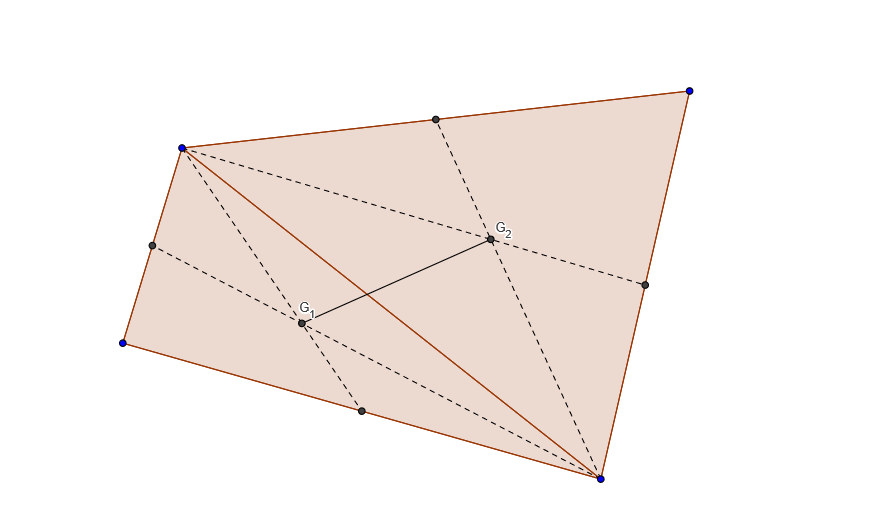
This GeoGebra example demonstrates how to construct the centroid (center of gravity) of geometric figures.①What it shows: Locating the centroid of an isosceles triangle and a parallelogram through intersection of medians, illustrating the 2:1 ratio property where the centroid divides each median.②Math concepts: Geometric centroid/center of mass, triangle medians, parallelogram diagonals, isosceles triangle properties, vector decomposition.③Construction: Use Polygon command to draw triangle ABC and parallelogram ABCD; Midpoint command to find edge midpoints; Segment command to connect vertices with opposite edge midpoints (medians); Intersect command to find centroid G as median intersection; Verify distance ratio between vertex and centroid to midpoint equals 2:1.④Target audience: Middle school geometry (Grade 8), high school vector and coordinate geometry, useful for demonstrating center of mass in physics.
GeoGebra Commands & Parameters
Polygon(A, B, C, D) → poly1, a, b, c, dPolygon(A, C, B) → poly2, b_1, a_1, c_1Polygon(A, D, C) → poly3, c_2, a_2, d_1Midpoint(a) → EMidpoint(b) → FSegment(A, F) → eSegment(C, E) → fIntersect(e, f) → G_1Midpoint(d) → GMidpoint(c) → HSegment(A, H) → gSegment(C, G) → hIntersect(g, h) → G_2Segment(G_1, G_2) → i
AI Drawing Prompt Reference
Draw an isosceles triangle ABC and a parallelogram ABCD, and find their centroid G. First, use the polygon command to draw the triangle and parallelogram, then find the midpoints of each side E, F, G, H. Next, use the segment command to connect the vertices with the opposite side midpoints to form the medians. Finally, determine the centroid G as the intersection of the medians.
The prompt above was compiled from the original drawing commands and is for reference only.