
GeoGebra Lesson: Working with Trigonometric Ratios (IM Geo.4.6)
Loading the math board and drawing, please wait…
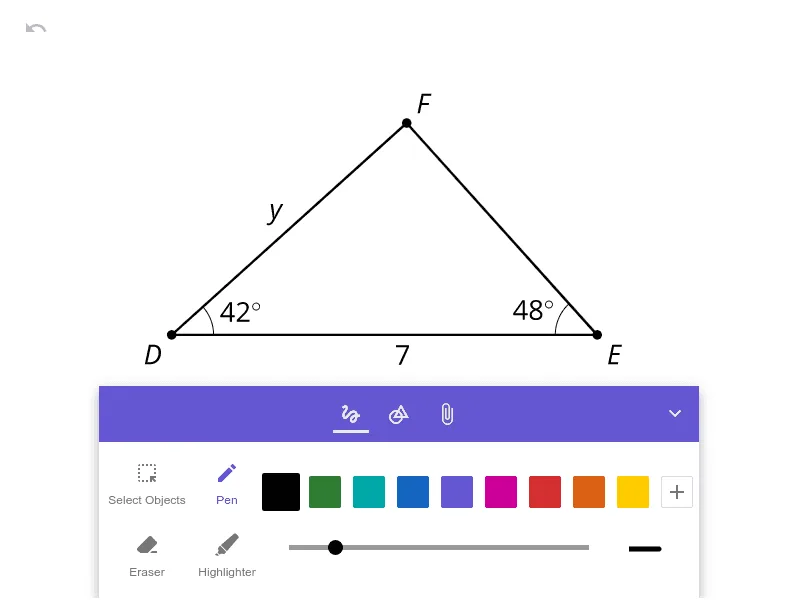
This example demonstrates how to interpret and apply trigonometric ratios (sine, cosine, and tangent) within a geometric setting, typically using a right-triangle configuration. The key math concepts include relating an angle to the corresponding side lengths of a right triangle, computing and checking trig ratio values, and making the connection between angle measurement and numerical outputs explicit and visual. Construction-wise, the activity centers on creating the geometric objects (a right triangle and the relevant angle) and then using angle/length measurement together with trigonometric computations to produce the ratio values; if implemented dynamically, the diagram updates as the angle changes to reveal how the ratios vary. It is suitable for middle to high school students learning trigonometry, especially for lessons that connect geometry with trigonometric reasoning.
AI Drawing Prompt Reference
Draw a right triangle, label one acute angle, and display the lengths of the opposite side, adjacent side, and hypotenuse. Calculate and show the sine, cosine, and tangent values for this angle based on these side lengths, linking the calculated values to the ratios of the triangle's sides to illustrate the definitions of trigonometric functions. If possible, make the angle dynamic and update the sine, cosine, and tangent values in real-time to show how they change with the angle.
The prompt above was compiled from the original drawing commands and is for reference only.