
GeoGebra Geometric Construction: Rectangle and Inscribed Circle
Loading the math board and drawing, please wait…
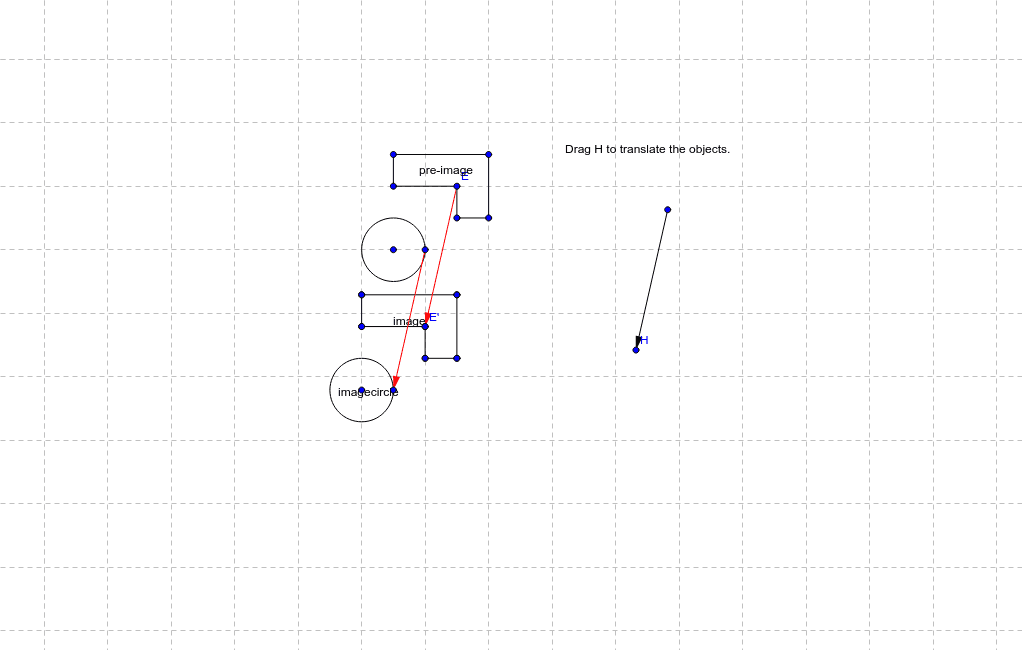
This example demonstrates constructing a rectangle and calculating its inscribed circle using GeoGebra. Key mathematical concepts include plane geometry, complex number representation, and circle properties. Construction involves commands like Segment, Vector, Translate, and Circle to create objects dynamically. Suitable for middle school students learning geometric foundations or for math teaching demonstrations.
GeoGebra Commands & Parameters
Segment(A, B) → aSegment(B, C) → bSegment(C, D) → cSegment(D, E) → dSegment(E, F) → eSegment(F, A) → fVector(G, H) → uTranslate(A, u) → A'Translate(B, u) → B'Segment(A', B') → imageTranslate(B, u) → B'_1Translate(C, u) → C'Segment(B'_1, C') → b'Translate(C, u) → C'_1Translate(D, u) → D'Segment(C'_1, D') → c'Translate(D, u) → D'_1Translate(E, u) → E'Segment(D'_1, E') → d'Translate(E, u) → E'_1Translate(F, u) → F'Segment(E'_1, F') → e'Translate(F, u) → F'_1Translate(A, u) → A'_1Segment(F'_1, A'_1) → f'Circle(I, J) → gTranslate(g, u) → imagecircleTranslate(I, u) → I'Translate(J, u) → J'Vector(J, J') → vVector(E, E') → w
AI Drawing Prompt Reference
Draw a rectangle and an inscribed circle inside it. Start by creating four vertices A, B, C, and D to form the rectangle. Then, using translation vector u, create parallel lines to the sides of the rectangle to form a new rectangle of the same size. Next, find the center point I of the rectangle and the center J of the inscribed circle, and use point J and vector v to create the inscribed circle, then translate it to the center of the new rectangle.
The prompt above was compiled from the original drawing commands and is for reference only.