
Geogebra Demo: Averaging Two Numbers
Loading the math board and drawing, please wait…
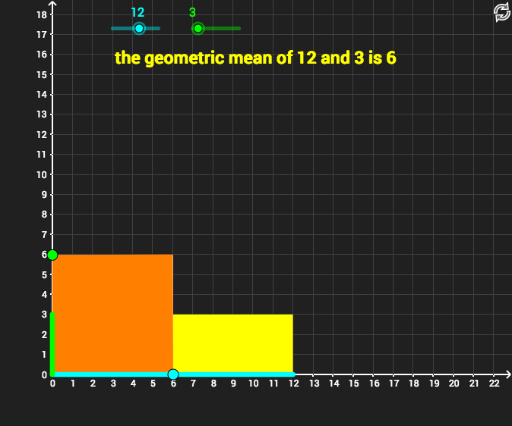
This example dynamically demonstrates the concept and calculation of averaging two numbers using GeoGebra. It visually shows how to find the midpoint on a number line between two values, thereby understanding the geometric meaning of the average. Core mathematical concepts include number line, average, geometric construction. Key construction elements use GeoGebra commands/objects like Point, Polygon, Intersect, with sliders to dynamically adjust values and observe changes in the average. Suitable for middle school students and above to grasp the concept of averages, geometric intuition, and dynamic mathematical ideas.
GeoGebra Commands & Parameters
Point(yAxis) → BPoint(xAxis) → CPolygon(A, C, D, B) → poly1, a_1, c, d, b_1Polygon(A, (h, 0), (h, v), (0, v), A) → poly2, a, f, g, i, a_2Polygon(J, K, O, N) → poly4, j_2, k_1, o, n_1Point(yAxis) → PPolygon(N, O, F, E) → poly3, n, o_1, f_1, ePolygon(P, Q, E, G) → poly5, p_1, q, e_1, g_1Polygon(A, J, Q, P) → poly6, a_3, j, q_1, p_2Polygon(H, C, M, B) → poly7, h_1, c_1, m, bPolygon(A, J, S, P) → poly8, a_4, j_1, s, p_3Intersect(s, p_3) → TPolygon(T, S, E, G) → poly9, t, s_1, e_2, g_2