
Geo-2017-Construction11-SimilarRightTriangles:Similar Right Triangles Constructi
Loading the math board and drawing, please wait…
In collections
Geometry Construction Journal: 2017-2018
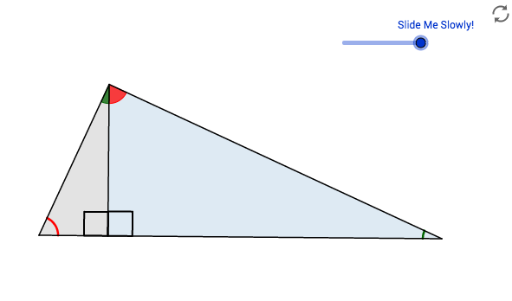
This example demonstrates how to construct similar right triangles using GeoGebra and explore their geometric properties. Key mathematical concepts include similarity of triangles, the Pythagorean theorem, and properties of right triangles. Construction involves using commands like Segment, Midpoint, OrthogonalLine, Circle, and Polygon, along with objects such as A, B, C, and others. This example is suitable for middle or high school mathematics learners to understand geometric construction techniques and applications of similar triangles.
GeoGebra Commands & Parameters
Segment(A, B) → aMidpoint(a) → C_1OrthogonalLine(C_1, a) → bCircle(C_1, A) → cSemicircle(A, B) → dPoint(d) → CSegment(A, C) → eSegment(C, B) → fOrthogonalLine(C, a) → gIntersect(g, a) → ESegment(C, E) → hAngle(B, E, C) → αAngle(A, C, B) → βPolygon(A, E, C) → poly1, d_1, a_1, e_1Polygon(E, B, C) → poly2, d_2, e_2, b_1Circle(A, 1) → kCircle(C, 1) → pCircle(B, 1) → qIntersect(p, e_1, 1) → FIntersect(a_1, b_1) → GIntersect(a_1, b_1) → HIntersect(p, h, 1) → IIntersect(p, f, 1) → JIntersect(q, a, 1) → KIntersect(q, f, 1) → LIntersect(k, a, 1) → MIntersect(k, e, 1) → NCircleSector(A, M, N) → rDilate(C, If[-2 < i < -1, -1 - i, 0], E) → D'Segment(C, D') → jCircleSector(C, I, J) → sCircleSector(B, L, K) → tCircleSector(C, F, I) → c_1Angle(C, E, A) → γDilate(A, If[-0.5 < i < 0.5, 0.5 - i, 1], C) → A'Vector(A, A') → uTranslate(r, u) → r'Rotate(r', If[-0.5 < i < 0.5, (((-(i + 0.5)) * 90))°], A') → r''CircleArc(A, M, N) → f_1Dilate(B, If[0.5 < i < 1.5, 1.5 - i], C) → B'Vector(B, B') → vTranslate(t, v) → t'Rotate(t', If[0.5 < i < 1.5, (((i - 0.5) * 90))°], B') → t''CircleArc(B, L, K) → g_1Polygon(A, B, C) → poly3, d_3, a_2, b_2
AI Drawing Prompt Reference
Draw a right triangle whose hypotenuse is a horizontal segment: construct the midpoint and perpendicular bisector of the segment, draw a semicircle on the segment, choose a point on the semicircle, and connect it to the endpoints. Drop a perpendicular from that point to the hypotenuse, creating two smaller right triangles similar to the original. Add equal-radius circles centered at the three vertices, mark their intersections with the triangle sides and the altitude, and use those points to form vertex sectors and arcs. Include moving points along the legs and altitude, with translated and rotated copies of the sectors, to illustrate the construction and properties of similar right triangles.
The prompt above was compiled from the original drawing commands and is for reference only.