
Fractions as Multiplicative Comparison
Loading the math board and drawing, please wait…
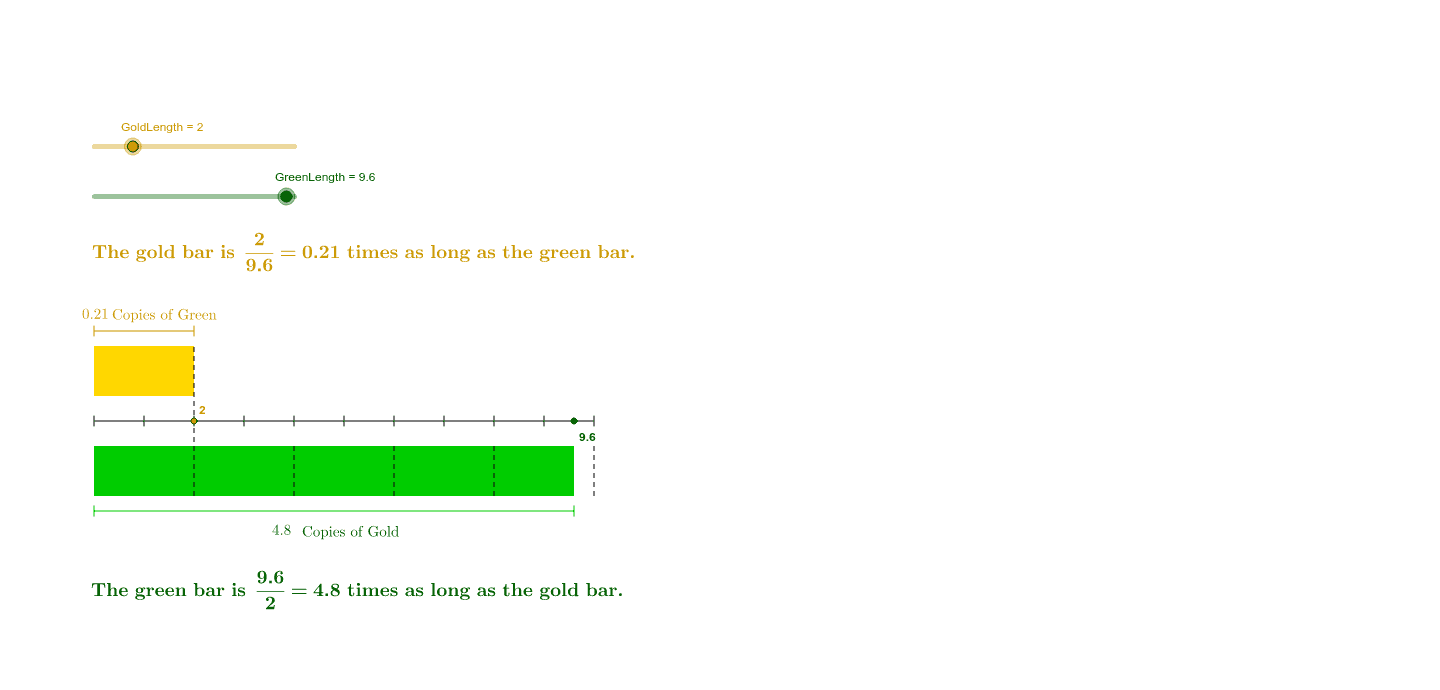
This tool helps understand fractions as a multiplicative comparison between two quantities. By adjusting the lengths of the gold and green segments, you can observe how fractions represent one quantity being a multiple of another. Key math concepts include fractions and multiplicative comparison. GeoGebra commands used include Point, Polygon, If, Segment, etc. Suitable for upper elementary or middle school students learning about fractions.
GeoGebra Commands & Parameters
Point(xAxis) → APolygon(A, B, C, D) → GreenBar, a, b, c, dPoint(yAxis) → EPoint(yAxis) → FPolygon(E, F, G, H) → GoldBar, e, f, g, hIf(GoldLength < GreenLength, If[GoldLength ≥ 1, If[2 < ceil(GreenLength / GoldLength) + 1, Segment[((2 * GoldLength), 0), ((2 * GoldLength), 1)]]]) → GreenLine2If(GoldLength < GreenLength, If[GoldLength ≥ 1, If[3 < ceil(GreenLength / GoldLength) + 1, Segment[((3 * GoldLength), 0), ((3 * GoldLength), 1)]]]) → GreenLine3If(GoldLength < GreenLength, If[GoldLength ≥ 1, If[4 < ceil(GreenLength / GoldLength) + 1, Segment[((4 * GoldLength), 0), ((4 * GoldLength), 1)]]]) → GreenLine4If(GoldLength < GreenLength, If[GoldLength ≥ 1, If[5 < ceil(GreenLength / GoldLength) + 1, Segment[((5 * GoldLength), 0), ((5 * GoldLength), 1)]]]) → GreenLine5If(GoldLength < GreenLength, If[GoldLength ≥ 1, If[6 < ceil(GreenLength / GoldLength) + 1, Segment[((6 * GoldLength), 0), ((6 * GoldLength), 1)]]]) → GreenLine6If(GoldLength < GreenLength, If[GoldLength ≥ 1, If[7 < ceil(GreenLength / GoldLength) + 1, Segment[((7 * GoldLength), 0), ((7 * GoldLength), 1)]]]) → GreenLine7If(GoldLength < GreenLength, If[GoldLength ≥ 1, If[8 < ceil(GreenLength / GoldLength) + 1, Segment[((8 * GoldLength), 0), ((8 * GoldLength), 1)]]]) → GreenLine8If(GoldLength < GreenLength, If[GoldLength ≥ 1, If[9 < ceil(GreenLength / GoldLength) + 1, Segment[((9 * GoldLength), 0), ((9 * GoldLength), 1)]]]) → GreenLine9If(GoldLength > GreenLength, If[GreenLength ≥ 1, Segment[(GreenLength, 0), (GreenLength, 3)]]) → GoldLine1If(GoldLength > GreenLength, If[GreenLength ≥ 1, If[3 < ceil(GoldLength / GreenLength) + 1, Segment[((3 * GreenLength), 2), ((3 * GreenLength), 3)]]]) → GoldLine3If(GoldLength > GreenLength, If[GreenLength ≥ 1, If[5 < ceil(GoldLength / GreenLength) + 1, Segment[((5 * GreenLength), 2), ((5 * GreenLength), 3)]]]) → GoldLine5If(GoldLength > GreenLength, If[GreenLength ≥ 1, If[7 < ceil(GoldLength / GreenLength) + 1, Segment[((7 * GreenLength), 2), ((7 * GreenLength), 3)]]]) → GoldLine7If(GoldLength > GreenLength, If[GreenLength ≥ 1, If[2 < ceil(GoldLength / GreenLength) + 1, Segment[((2 * GreenLength), 2), ((2 * GreenLength), 3)]]]) → GoldLine2If(GoldLength > GreenLength, If[GreenLength ≥ 1, If[10 < ceil(GoldLength / GreenLength) + 1, Segment[((10 * GreenLength), 2), ((10 * GreenLength), 3)]]]) → GoldLine10If(GoldLength > GreenLength, If[GreenLength ≥ 1, If[4 < ceil(GoldLength / GreenLength) + 1, Segment[((4 * GreenLength), 2), ((4 * GreenLength), 3)]]]) → GoldLine4If(GoldLength > GreenLength, If[GreenLength ≥ 1, If[6 < ceil(GoldLength / GreenLength) + 1, Segment[((6 * GreenLength), 2), ((6 * GreenLength), 3)]]]) → GoldLine6If(GoldLength > GreenLength, If[GreenLength ≥ 1, If[8 < ceil(GoldLength / GreenLength) + 1, Segment[((8 * GreenLength), 2), ((8 * GreenLength), 3)]]]) → GoldLine8If(GoldLength > GreenLength, If[GreenLength ≥ 1, If[9 < ceil(GoldLength / GreenLength) + 1, Segment[((9 * GreenLength), 2), ((9 * GreenLength), 3)]]]) → GoldLine9If(GoldLength < GreenLength, If[GoldLength ≥ 1, If[10 < ceil(GreenLength / GoldLength) + 1, Segment[((10 * GoldLength), 0), ((10 * GoldLength), 1)]]]) → GreenLine10If(GoldLength ≤ GreenLength, If[GoldLength ≥ 1, Segment[(GoldLength, 0), (GoldLength, 3)]]) → GreenLine1Segment((0, 1.5), (10, 1.5)) → ruler12Segment((0, 1.4), (0, 1.6)) → ruler10Segment((1, 1.4), (1, 1.6)) → ruler11Segment((2, 1.4), (2, 1.6)) → ruler1Segment((3, 1.4), (3, 1.6)) → ruler2Segment((4, 1.4), (4, 1.6)) → ruler3Segment((5, 1.4), (5, 1.6)) → ruler4Segment((6, 1.4), (6, 1.6)) → ruler5Segment((7, 1.4), (7, 1.6)) → ruler6Segment((8, 1.4), (8, 1.6)) → ruler7Segment((9, 1.4), (9, 1.6)) → ruler8Segment((10, 1.4), (10, 1.6)) → ruler9Segment((0, 3.2), (0, 3.4)) → kSegment((0, 3.3), (GoldLength, 3.3)) → iSegment((GoldLength, 3.2), (GoldLength, 3.4)) → lSegment((0, -0.3), (GreenLength, (-0.3))) → mSegment((0, -0.2), (0, -0.4)) → pSegment((GreenLength, (-0.2)), (GreenLength, (-0.4))) → q
AI Drawing Prompt Reference
Draw a geometric figure with a green rectangle and a golden rectangle. Adjust the length of the golden rectangle and observe its ratio to the green rectangle. Draw a horizontal line below the green rectangle with marks from 1 to 10. Draw another horizontal line above the golden rectangle with corresponding marks. Draw several line segments between the rectangles to show their multiple relationships.
The prompt above was compiled from the original drawing commands and is for reference only.