
Fractions and Decimals on the Number Line: Interactive Marking
Loading the math board and drawing, please wait…
In collections
Rationale Zahlen & Arbeiten mit der Zahlengerade
Bruchzahlen in endliche Dezimalzahlen umrechnen
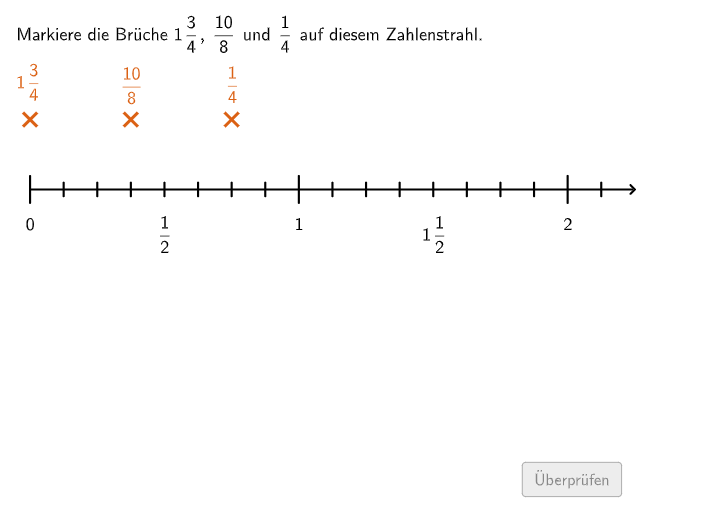
① This example demonstrates how to mark fractions and decimals on a number line, helping students visualize the correspondence between these two representations. ② The core mathematical concepts are conversion between fractions and finite/periodic decimals, and the placement of rational numbers on a number line. ③ Construction highlights: uses GeoGebra commands such as If, Flatten, Point, Zip, Sequence, Join, Segment, Circle, Translate, and CountIf to build an interactive interface with multiple point objects (A, B, C, D, E) and validation lists (listCorrect, etc.), allowing users to input values and receive automatic feedback on correctness. ④ Suitable for grades 5-6 or early middle school, this resource serves as a classroom demonstration or self-paced practice tool to strengthen number sense and understanding of rational numbers.
GeoGebra Commands & Parameters
If(step < 2, 0.125, 0.05) → pFlatten(Sequence[Sequence[(0, mins) + (m * (p, 0)) + (j * (0, 0.26)), m, 0, 17], j, 0, If[¬validate, 1, 0]]) → l2Point(l2) → EPoint(l2) → DFlatten(Sequence[Sequence[(0, (-mins)) + (m * (p, 0)) + (j * (0, 0.26)), m, 0, 17], j, 0, If[¬validate, 1, 0]]) → l1Point(l1) → APoint(l1) → CPoint(l1) → BZip(A ≟ B, A, Punkte, B, PunkteCorrect) → listCorrectZip(listCorrect(m), m, {4, 5}) → listCorrect2Zip(listCorrect(m), m, {1, 2, 3}) → listCorrect1Sequence(((i * 0.125), s1), i, 0, 17) → PunkteUSequence(((i * 0.125), (-s1)), i, 0, 17) → PunkteOSequence(Segment[PunkteO(1) + (m, (-linesize2)), PunkteO(1) + (m, linesize2)], m, 0, 2) → LinesLOSequence(Segment[PunkteU(1) + (m, (-linesize2)), PunkteU(1) + (m, linesize2)], m, 0, 2) → LinesLUJoin({Sequence[Segment[PunkteO(1) + (m / 8, (-linesize1)), PunkteO(1) + (m / 8, linesize1)], m, 1, 7], Sequence[Segment[PunkteO(1) + (m / 8, (-linesize1)), PunkteO(1) + (m / 8, linesize1)], m, 9, 15], Sequence[Segment[PunkteO(1) + (m / 8, (-linesize1)), PunkteO(1) + (m / 8, linesize1)], m, 17, 17]}) → LinesSOJoin({Sequence[Segment[PunkteU(1) + (m / 8, (-linesize1)), PunkteU(1) + (m / 8, linesize1)], m, 1, 7], Sequence[Segment[PunkteU(1) + (m / 8, (-linesize1)), PunkteU(1) + (m / 8, linesize1)], m, 9, 15], Sequence[Segment[PunkteU(1) + (m / 8, (-linesize1)), PunkteU(1) + (m / 8, linesize1)], m, 17, 17]}) → LinesSUSegment(PunkteO(1), PunkteO(1) + (2.25, 0)) → LineOSegment(PunkteU(1), PunkteU(1) + (2.25, 0)) → LineUSequence(Text[ReplaceAll["\textsf{" + (i) + "}", ".", ","], ((i * 1) + 0, y(PunkteU(1)) - 0.19), true, true, -0, 1], i, 0, 2, 0.5) → TextUIf(step ≟ -1, {A, B, C} ⊆ PunkteO, {D, E} ⊆ PunkteU) → fixedSequence(Text[ReplaceAll["\textsf{" + (i) + "}", ".", ","], ((i * 1) + 0, y(PunkteO(1)) - 0.19), true, true, -0, 1], i, 0, 2, 1) → Text2Join({{(0, (-s1))}, Zip[(m, (-s1)), m, WertePunkte2]}) → Punkte2Point(Punkte2) → FNumberSeparationComma(x(F)) → Text7Circle(D, radi) → fCircle(E, radi) → gIf(step ≟ -1, correct1, If[step ≟ 0, correct2, If[step ≟ 2, s1 ≟ 0, true]]) → fixednextTranslate(v1, (1, 0)) → v2CountIf(m ≟ false, m, listCorrect1) → falseCount1CountIf(m ≟ false, m, listCorrect2) → falseCount2Sequence(Text[listeTextsO(m + 1), ((m * 0.5), y(PunkteO(1)) + If[step < 1, -0.07, 0.23]), true, true, 0, -1], m, 0, 4, 1) → TextOSequence(Text[ReplaceAll["\textsf{" + (i) + "}", ".", ","], ((i * 1) + 0, y(PunkteU(1)) - 0.19), true, true, -0, 1], i, 0.25, 1.75, 1.5) → TextU2Circle(A, radi) → cCircle(B, radi) → dCircle(C, radi) → e
AI Drawing Prompt Reference
Draw a horizontal number line and mark rational numbers using both fraction-style and decimal-style representations. First set a uniform step for the tick spacing, then place several marked points to the right along the axis in two layers: an upper row for one representation and a lower row for the corresponding values. Connect adjacent points within each layer using short segments, and add additional vertical/diagonal linking segments at key indices to show how the two layers correspond. Place formatted text labels near selected positions to display the fraction/decimal notation with commas for readability. Finally, emphasize matching pairs by drawing circles around specific marked points (one circle for each chosen upper point and corresponding lower point), and include visual feedback elements indicating whether predefined mappings are correct or not.
The prompt above was compiled from the original drawing commands and is for reference only.