
Fraction Visualization
Loading the math board and drawing, please wait…
In collections
学习 GeoGebra 经典应用
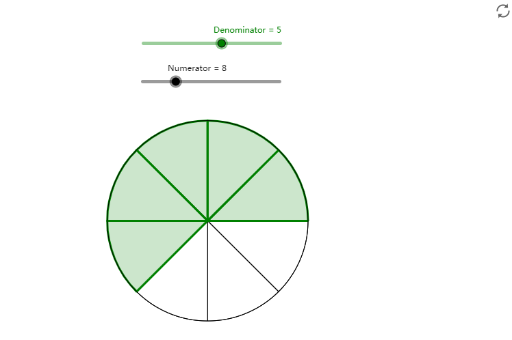
This example demonstrates the geometric representation of fractions through dynamic graphics; involves core math concepts like fractions, numerators, denominators, geometric mean, and logic; constructed using GeoGebra commands Circle and Sequence to create and display geometric models of fractions, involving objects such as numerator, denominator, α, A, r, c, Liste1, Liste2; suitable for middle school and above mathematics education, providing an intuitive understanding of the relationship between fractions and geometric shapes.
GeoGebra Commands & Parameters
Circle(A, r) → cSequence(CircleSector[A, ((r * cos((α * (i - 1)))), (r * sin((α * (i - 1))))), ((r * cos((α * i))), (r * sin((α * i))))], i, 1, Numerator) → Liste1Sequence(CircleSector[A, ((r * cos((α * (i - 1)))), (r * sin((α * (i - 1))))), ((r * cos((α * i))), (r * sin((α * i))))], i, 1, Denominator) → Liste2
AI Drawing Prompt Reference
Draw a geometric representation of fractions. The figure should include a circle and a sector. The circle's radius represents the denominator, and the sector's angle represents the numerator. The sector should start from the center and connect to points on the circumference. The figure should intuitively show the relationship between fractions and geometric shapes, suitable for middle school students.
The prompt above was compiled from the original drawing commands and is for reference only.