
Fraction Comparer
Loading the math board and drawing, please wait…
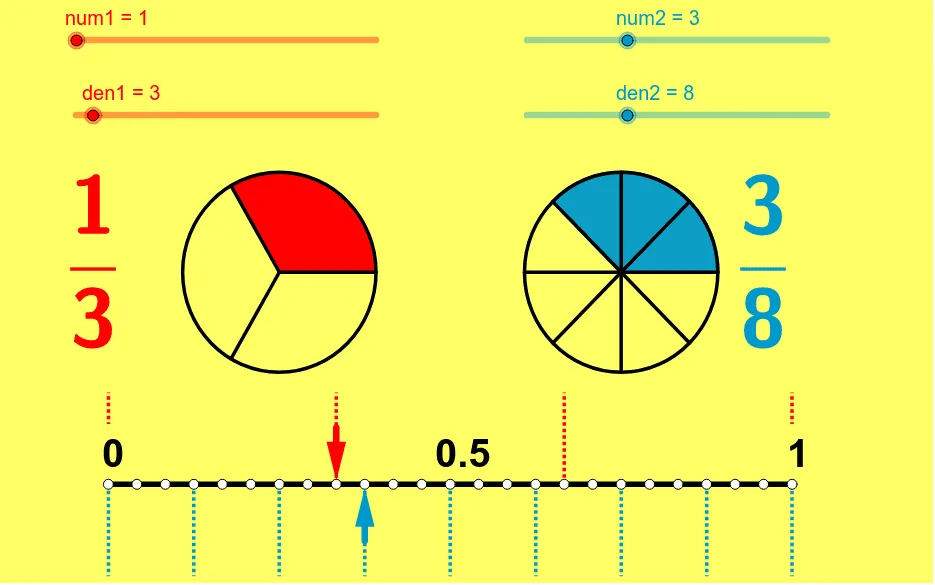
This example demonstrates how to visually compare and order fractions. It involves core math concepts like fraction comparison, least common multiple (LCM), and geometric representation. GeoGebra commands used include Sequence, CircleSector, Segment, Vector, and LCM. Suitable for middle school mathematics teaching to help students intuitively understand the relationships between fractions.
GeoGebra Commands & Parameters
Sequence((sqrt(2) * cos(i * 360 * ° / den1) + x(B), sqrt(2) * sin(i * 360 * ° / den1) + y(B)), i, 1, den1) → leftptsSequence((sqrt(2) * cos(i * 360 * ° / den2) + x(A), sqrt(2) * sin(i * 360 * ° / den2) + y(A)), i, 1, den2) → rightptsSequence(Segment[B, Element[leftpts, i]], i, 1, den1) → segleftSequence(Segment[A, Element[rightpts, i]], i, 1, den2) → segrightCircleSector(B, Element[leftpts, den1], Element[leftpts, num1]) → eCircleSector(A, Element[rightpts, den2], Element[rightpts, num2]) → fSegment(D, C) → aVector(F, E) → uVector(G, H) → vSequence((-5 + i * 10 / den1, 0), i, 0, den1) → list1Sequence((-5 + i * 10 / den1, 1.3), i, 0, den1) → list2Sequence(Segment[Element[list1, i], Element[list2, i]], i, 1, den1 + 1) → list3Sequence((-5 + i * 10 / den2, 0), i, 0, den2) → list4Sequence((-5 + i * 10 / den2, -1.3), i, 0, den2) → list5Sequence(Segment[Element[list4, i], Element[list5, i]], i, 0, den2 + 1) → list6LCM(den1, den2) → bSequence((-5 + i * 10 / b, 0), i, 0, b) → list7
AI Drawing Prompt Reference
Draw two circular sectors with centers at points B and A, with angles determined by the denominators and arc lengths by the numerators. Draw two segments connecting point B to the sector endpoints and point A to the sector endpoints. Draw two circles centered at points B and A with the same radius. Draw a line segment connecting the centers of the two circles. Draw two lists representing the radii of the two circles and then draw the arcs of the two circles.
The prompt above was compiled from the original drawing commands and is for reference only.