
Fraction Addition Visualization (CUEBA0028)
Loading the math board and drawing, please wait…
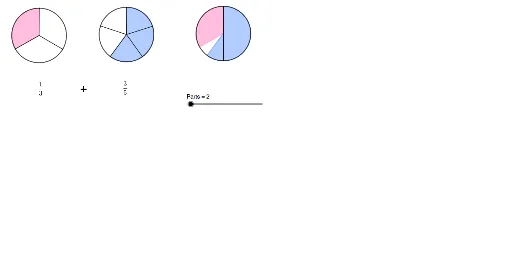
① This GeoGebra example dynamically demonstrates the addition of two fractions, using geometric partitioning and merging to visualize the process. ② Core mathematical concepts include fraction basics, common denominators (LCM), addition operations, and extensions to continuity and median values, alongside geometric elements like general quadrilaterals and special points. ③ Construction highlights: commands such as Circle, Sequence, Sector, Point, Line, Intersect, Vector, Translate, LCM, and Product are used; objects include Den2, Num1, Num2, text2, and many others, building a complete model for fraction addition. ④ Suitable for upper elementary to middle school students learning fraction addition, and useful for teachers to illustrate equivalent fractions and common denominators, also serving as an interdisciplinary example connecting arithmetic and geometry.
GeoGebra Commands & Parameters
Circle(A, B) → cSequence(Rotate[B, i°, A], i, 0, 360, 360 / Den1) → l1Sequence(Segment[A, Element[l1, k]], k, 1, Den1) → l2Sector(c, B, Element[l1, Num1 + 1]) → dSequence(Rotate[B_1, i°, A_1], i, 0, 360, 360 / Den2) → l1_1Circle(A_1, B_1) → c_1Sector(c_1, Element[l1_1, Den2 - Num2 + 1], B_1) → d_1Point(l1) → CLine(B, B_1) → fLine(A, A_1) → gPoint(g) → DPoint(f) → ECircle(D, E) → eIntersect(e, f) → F, GVector(B_1, F) → uVector(B, F) → vTranslate(d, v) → d'Translate(d_1, u) → hIntersect(e, d', 1) → HSequence(Rotate[H, t°, D], t, 0, 360, 360 / Ans) → l3Sequence(Segment[D, Element[l3, k]], k, 1, Ans) → l4Sequence(Segment[A_1, Element[l1_1, k]], k, 1, Den2) → l2_1LCM(Den1, Den2) → aLCM(Den1, Den2) → bProduct({b / Den1, Num1}) → iProduct({b / Den2, Num2}) → j